
Web tracking is the collection of data about a visitor’s behavior on a website, and across websites, by the site itself and by third-party code running on it. On a typical business site, what the browser collects travels through up to five hops: the page’s own collection code, a tag manager, the approved vendor behind each tag, that vendor’s own vendors, and (at the far end, by resale or ad-market mechanics) data brokers and the bidstream.
Most organizations can explain the first hop: their privacy policy, record of processing activities (RoPA), and vendor contracts state what they plan to collect and who should receive it. But these documents are not the systems that decide where the data actually goes. Often, the two do not match.
Key takeaways
- Web tracking is a family of mechanisms (cookies, pixels, scripts, fingerprints, replay), each carrying a different payload and run by a different party.
- Collected data travels up to five hops: collection, tag manager, approved vendor, vendor’s vendor, broker/bidstream, with observability decaying at every step past the browser.
- Legality splits on one axis: opt-in regimes (EU) versus opt-out regimes (US states), with wiretap statutes as a separate, litigated layer.
- There are four consent states, not two. “Visitor did nothing” is the one almost nobody tests.
- Your CMP, RoPA, and vendor contracts record intent. Only network capture records behavior. Compliance programs need both, and routinely have only the first.
- Server-side tracking removes visibility, not obligations. The observation boundary is real and should be stated, not worked around.
This page is for the organization doing the tracking, not the person trying to avoid it: the mechanisms, the journey the data takes after collection, and whether the controls you already have can prove any of it. If you own a consent management platform (CMP), data-loss-prevention (DLP) tooling, and a folder of vendor attestations, and are concerned about “where does our visitor data actually end up?” This page walks the wire.
What is web tracking?
Web tracking is the set of mechanisms a website uses to record what a visitor does (web pages viewed, clicks, form entries, session context) and to recognize that visitor again later, on the same site or on other sites. “Tracking” is not one thing; it is a family of mechanisms, each carrying a different payload and each run by a different party.
| Mechanism | What it can expose or carry | Who typically runs it |
| First-party cookies | Session state, preferences, first-party analytics IDs | The website or services operating in its first-party context |
| Third-party cookies | Identifiers that can recognize the same browser across different sites, where browser policy allows it | Advertising, analytics, identity, and other third-party services |
| Tracking pixels / web beacons | A request triggered by a page or email view, which may include identifiers, request metadata, referrer information, or parameters deliberately added to the request | Marketing, advertising, and analytics vendors |
| JavaScript tags and SDKs | Page metadata and user interactions such as clicks, form events, navigation, and other configured events | Analytics, application-performance-monitoring (APM), support, customer-data-platform (CDP), advertising, and other software vendors |
| Tag managers | Events and values made available through variables or a data layer, which can then be passed to other tags | Usually the website team through tools such as Google Tag Manager |
| Browser fingerprinting | A derived identifier based on combinations of browser, operating-system, display, language, font, rendering, and other device characteristics | Advertising, anti-fraud, analytics, and identity vendors |
| IP addresses and device signals | IP address, browser or client information, network details, and signals that can be used to infer characteristics such as device type or approximate location | The website, CDN, hosting provider, and third parties receiving requests |
| Session replay | Page-structure (DOM) playback: clicks, mouse movements, keystrokes. Masking of sensitive fields is a configuration. Capture is the baseline capability | Analytics and UX vendors |
| Browser extensions | Page content and browsing activity, depending on permissions: a channel the standard artifacts (RoPA, vendor list, CMP configuration) do not capture | The extension publisher |
Fingerprinting is the outlier in that list because it requires nothing to be stored on the device. The W3C defines it as
“the capability of a site to identify or re-identify a visiting user, user agent, or device via configuration settings or other observable characteristics”.
Delete every cookie you like; the characteristics remain.
The cookie that started all this was invented at Netscape by Lou Montulli around July 1994, as a way to give otherwise stateless websites memory. He built it to prevent the exact thing it is now blamed for: a session ID that went back only to the site that set it, which, in his own words, “prevented cross-site tracking.”
The spec lineage runs from RFC 2109 (1997) and RFC 2965 (2000) to RFC 6265 (2011), which is still the standard today, with its successor awaiting publication. The middle two were moved to Historic. Browsers never left Netscape’s original design, so RFC 6265 ended up documenting what the web was already doing. What changed is not the mechanism. It is the party count.
The cookie itself stayed relatively simple. The ecosystem around it did not.
First party, third party, and the fourth party you may never see. First-party tracking happens in your site’s own context. Third-party tracking involves an outside service, such as an analytics tag or advertising pixel, operating on your pages.
A fourth party sits one step further downstream: a service used by your third-party vendor. You may never have contracted with it directly, and it may not appear in your immediate vendor inventory. That downstream chain is the focus of the hops section below.
Cross-site tracking, in its classic cookie-based form, works like this: a vendor receives an identifier when someone visits Site A. If the same vendor can access that identifier on Site B, it can associate those visits with the same browser. That recognition can then support profiling, measurement, or advertising elsewhere.
Browsers have narrowed that model, but unevenly, and the differences matter more than the headlines suggest. Firefox gives third-party cookies a separate cookie jar per site under Total Cookie Protection, on by default. Safari applies Intelligent Tracking Prevention under its published tracking-prevention policy. Chrome does not block third-party cookies by default at all, only in Incognito or when a user changes the setting themselves.
Restricting third-party cookies does not end cross-site tracking. WebKit documents workarounds it has defended against, including link decoration, where trackers append identifiers, such as click IDs, to URLs and then pick them up on the destination site via JavaScript.
Fingerprinting, redirects, server-side data sharing, and identity matching survive the loss of the third-party cookie because none depend on it.
For a site operator, the real question is not whether tracking exists, but what data leaves the site and where it ends up.
Why organizations track
Most website tracking exists for ordinary commercial reasons, and each legitimate use has an edge where it shades into exposure:
- Analytics and product improvement: analytics tools and analytics services track users, collecting data about their behavior and website traffic to gain valuable insights. This data tracking helps organizations improve website performance.
Risk edge: analytics scripts see everything on the page, not just the aggregate in your dashboard. - Personalization: remembering preferences, customizing based on user behavior.
Risk edge: personalization profiles are exactly the records disclosure laws ask you to enumerate. - Targeted advertising and attribution: which campaign brought this visitor, what they’re shown next, and how browsing history and other user activity can support targeted ads.
Risk edge: this is where cross-site identifiers and the most recipients live. - Security and fraud detection: IP reputation, bot screening, impossible-travel checks.
Risk edge: “security” is the purpose most often cited for trackers that also do marketing. - Session replay and UX research: watching real sessions to fix real problems.
Risk edge: the tool that can replay a session can replay a password field, unless masking was configured and verified.
None of this argues against tracking. It argues for knowing what your tracking actually does: a different question from knowing what your tracking policy says. When the question turns from edge to cost (what the exposure is worth), that sizing is its own discipline: see data privacy risk.
If you’re HIPAA-adjacent: the rules are different, and stricter. A cookie banner is not a HIPAA authorization. HHS’s Office for Civil Rights says so in as many words on its online tracking technologies guidance, which also notes that parts of that guidance were vacated in court while the agency keeps the page live with narrowed language. If regulated health data touches your marketing site, read this page for the mechanics, then switch to HIPAA’s tracking rules for the compliance matrix.
Is web tracking legal?
Yes, mostly: web tracking is legal by default and regulated at the edges, and which edge applies depends on where your visitors are, not where you are. The regimes differ in one way that matters operationally: whether tracking needs permission before it happens (opt-in) or must merely be stoppable after (opt-out).
| Regime | Consent model | Who must comply |
| ePrivacy Directive, Art. 5(3) | Opt-in: storing or accessing information on a visitor’s device requires consent after clear information, except what is strictly necessary or technically required for transmission. (The consent standard dates from the 2009 amendment.) | Anyone placing or reading cookies or equivalents on EU/EEA users’ devices, via national implementing laws |
| General Data Protection Regulation (GDPR) (applies since 25 May 2018) | Lawful basis per purpose (for tracking, usually consent) plus transparency duties: Art. 13(1)(e) requires naming the recipients or categories of recipients of personal data | Anyone processing EU/EEA residents’ personal data. Fines up to €20M or 4% of worldwide annual turnover, whichever is higher (Art. 83(5)) |
| CCPA/CPRA | Opt-out: consumers can direct a business to stop selling or sharing their personal information. Businesses must honor opt-out preference signals such as Global Privacy Control (GPC) under 11 CCR §7025(b) | For-profit businesses meeting statutory thresholds that collect California residents’ data |
| Other US state laws | Mostly opt-out, with a growing universal-opt-out (UOOM) duty: Colorado requires honoring UOOM signals since July 1, 2024. Connecticut since January 1, 2025 | Businesses meeting each state’s applicability thresholds |
| FTC Act §5 | No consent regime, but a deception backstop: your public claims about your data collection practices must be true. The FTC banned Avast from selling browsing data in February 2024 after it sold data while promising to block tracking | Every US company. First-time deception typically yields consent orders with redress rather than civil penalties |
Two framing points. First, the United States has no single comprehensive federal privacy law, but calling the country “largely unregulated” is misleading. State privacy laws, wiretap statutes, sector-specific federal rules, and the FTC’s enforcement authority all shape how personal data can be collected and used.
For website operators, that can include requirements to disclose tracking and data collection practices when applicable privacy laws require it. California’s requirements and the consumer rights behind them are covered in our guide to the CCPA.
Second, tracking can raise a separate issue when it intercepts the contents of a communication. That is where state wiretap laws can come into play, most aggressively, California’s CIPA.
How your data moves: the five hops
Data collected through browser tracking does not just go to “the cloud.” It travels a chain with a specific shape: collection → tag manager → approved vendor → vendor’s vendor → broker and bidstream, each hop marked by how observable it is.
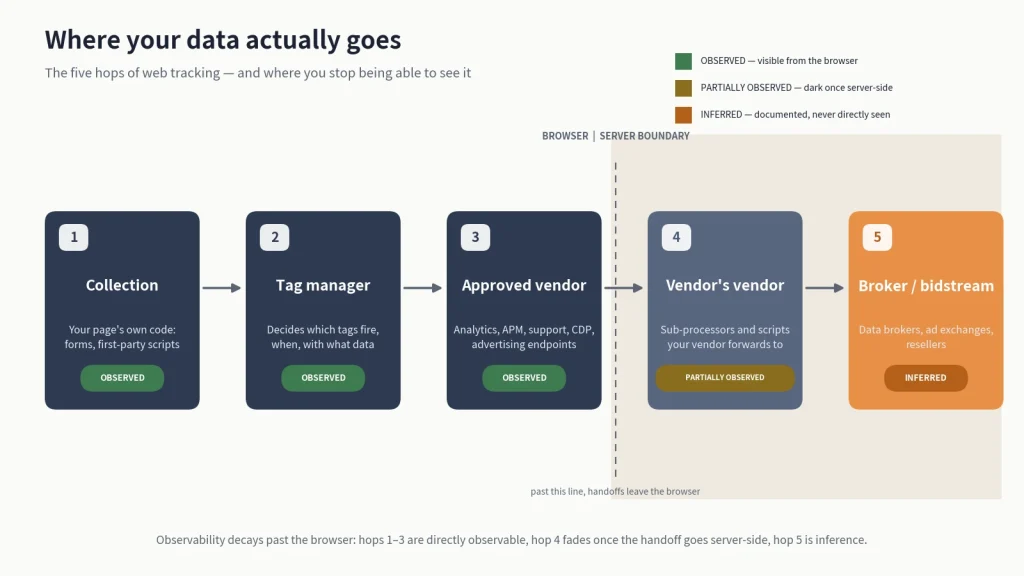
| Hop | Who receives | What anyone can observe |
| 1. Collection | Your page’s own code: forms, first-party scripts | Observed. Your code, your page. |
| 2. Tag manager | The container that decides which tags fire, when, with what data | Observed. Every load decision passes through it, in the browser, in plain sight. |
| 3. Approved vendor | Analytics, APM, support, CDP, advertising endpoints you contracted | Observed. Each request is visible in the web browser’s network traffic, payload included, including tracking scripts and other tracking files. |
| 4. Vendor’s vendor | Sub-processors and scripts your vendor loads or forwards to | Partially observed. Visible when they load in the browser. Invisible once the handoff happens on the vendor’s servers. |
| 5. Broker / bidstream | Data brokers, ad exchanges, resellers | Inferred. Documented industry practice and enforcement records, never directly observed from the browser. |
Hops 1–3 are observable from the outside, with no access to anyone’s servers. The browser is where the evidence lives. Hop 4 fades at the server boundary, and hop 5 is labeled inference because honesty about the boundary matters more than a tidy diagram: what happens after the data leaves the browser is documented by regulators and researchers, not observable by us. A single website visitor can generate many requests across repeated user visits, so visitor tracking and tracking files expand quickly across hops.
Map where your data actually flows →
This is not a theoretical chain. In our published Klaviyo research, a sign-up form missing a single HTML attribute caused the browser to serialize the entered password into the page URL. Since that URL is where every third-party script on the page reads from, it went to 31 third-party hostnames, four of which returned the password value in their responses, confirming receipt. The vulnerable form was observable in web archives from February 2024 to November 2025.
Klaviyo confirmed the finding and remediated it before publication. It characterized the number affected as fewer than 200, per TechCrunch’s reporting, a figure based on the company’s available active logs, not a count of everyone exposed over the window. The same research found the underlying pattern (credential- or PII-bearing forms without a method attribute) on 7,874 of the top 100,000 websites. In both cases, the leak was not a vendor behaving badly; it was ordinary tags reading a URL that should never have held a password or a customer’s name.
Find which sensitive values are moving through your pages→
The browser wars changed the plumbing
Browser restrictions have steadily made traditional client-side tracking less reliable, helping drive the shift toward server-side collection.
- June 5, 2017: Apple introduces Intelligent Tracking Prevention (ITP), restricting cross-site tracking through tighter controls on cookies and other website data.
- January 14, 2020: Google announces plans to phase out third-party cookies in Chrome within two years.
- March 24, 2020: Safari begins blocking third-party cookies by default, becoming the first mainstream browser to fully block them by default.
- June 14, 2022: Firefox rolls out Total Cookie Protection by default, confining cookies to the sites where they were created.
- July 22, 2024: Google changes course on third-party cookie deprecation. Instead of removing third-party cookies outright, Google proposes giving Chrome users more control over their tracking preferences.
- April 22, 2025: Google confirms it will maintain its existing approach to third-party cookies and says it will not introduce a separate standalone prompt.
- October 17, 2025: Google announces the retirement of several Privacy Sandbox technologies, including Topics, Protected Audience, Attribution Reporting, and IP Protection, citing ecosystem feedback and low adoption.
Ad blockers and tracker lists add another constraint by preventing many client-side scripts from loading at all. Together, these changes have made browser-based tracking less dependable, but they have not ended tracking. Collection has increasingly moved toward methods that are harder to observe from the browser, including first-party endpoints, CNAME-cloaked subdomains, and server-to-server APIs. That is why “we’ll just wait for browsers to kill tracking” fails as a strategy, and it sets up the harder question: what fires before anyone consents to anything?
What tracking scripts can fire before consent?
Anything the page references can fire before consent. The consent banner is itself just another script in the load order, frequently not the first. Consent gates a decision. It does not gate a page load, and scripts can run and send in the window between the two. Anything loaded before the visitor makes a choice has already had its opportunity to transmit.
The legal baseline makes the stakes precise. Under ePrivacy Art. 5(3), the only things that may fire before consent are what is strictly necessary (a load-balancer cookie, a session token) or technically required to transmit the page. Everything else that fires pre-consent is not a gray area. It is a finding. California law adds a harder edge: under the Ninth Circuit’s reading of CIPA in Javier v. Assurance IQ (2022), consent to interception must be prior; consent obtained after the transmission does not cure it.
Typical pre-consent loads, seen in the wild: the CMP’s own script (legitimate), tag-manager containers that fire their default tags on load, A/B testing tools, chat widgets, and analytics tags hard-coded outside the tag manager’s consent logic. The question to take back to your own site is short: with the banner up and untouched, what has already sent?
The consent banner is not the control you think it is
A CMP records choices. It does not, by itself, prove that any tag obeyed them. The gap between the recorded choice and the actual behavior is measurable, because there are four consent states, not two, and they can diverge independently:
| Visitor’s state | What the banner records | What the wire may show |
| Accept | Consent granted | Everything fires, as documented. The one state where stated and observed usually agree. |
| Reject | Refusal recorded | Tags may still fire: misconfigured consent mapping, hard-coded tags, or a CMP that blocks on paper only. |
| No action (banner shown, never touched) | Nothing recorded | The blind spot: many stacks treat “no choice” as “proceed,” firing full tracking for visitors who never consented to anything. |
| GPC / opt-out signal | Signal received (or not) | Under 11 CCR §7025(b), California businesses must honor the signal as a valid opt-out. Whether the tag layer respects it is a separate, testable fact. |
A fifth configuration (partial or granular consent, where a visitor accepts analytics but refuses advertising) is where consent-mapping errors concentrate, and it belongs in any serious test.
Each row is a testable claim about your own site: load the page in each state, watch the network, compare. In Melurna’s characterization of the current demand-letter wave, the recurring claims are exactly these divergences (firing before the banner, firing while the visitor reads it, opt-out signals ignored, firing after “reject all”), and courts have begun letting broken-banner cases past the motion-to-dismiss stage on privacy and unjust-enrichment theories, even where the wiretap counts fail (Wiley v. Universal Music Group, N.D. Cal., Dec. 17, 2025).
For the GPC mechanics and “Do Not Sell or Share” duties in depth, see the CCPA compliance guide.
Server-side tracking: harder to see, not solved
Moving tracking server-side (Meta’s Conversions API and its peers, first-party collection endpoints, server-side tag managers) removes the browser from the path. It does not remove the disclosure, the recipient, or the legal question; it removes your ability to watch. The consent, transparency, and opt-out duties attach to the processing, wherever it happens. What changes is evidence: a flow that never touches the browser leaves no network trace for anyone outside the two servers involved.
The observation boundary: client-side observation sees what the browser sends and receives. Server-to-server flows that never touch the browser are outside that observation: anyone’s observation, not just ours. If your tracking strategy is “we moved it server-side,” what you have is a less visible chain, not a shorter one.
Hop 3 becomes invisible, hop 4 becomes unknowable from the outside, and the stated-vs-observed test below becomes the only check left that doesn’t depend on the browser.
You approved one tag. Why are there nine?
Because tags load tags. A script you approved can fetch and execute further scripts from your vendor’s own vendors at runtime, a practice known as piggybacking. Your procurement process vetted one company; your page executes a chain.
The mechanics are routine. Your tag manager loads the approved vendor’s script. That script, running with the same page access as your own code, requests additional scripts from other domains (a sub-processor, an ad partner, an error-reporting service), and those run with the same access in turn. Each new script can read whatever the page exposes: URLs, form fields, permitted cookies, the tag manager’s data layer. This is hop 4, and it exists precisely because the loading decision moved from your HTML to someone else’s JavaScript.
This is what approval workflows miss. A vendor questionnaire captures who you contracted with. A sub-processor list captures who the vendor admits to, as of the day it was published. Neither captures what the script actually loads on a Tuesday in March. In the Klaviyo research, the second finding was exactly this shape: viewing a customer profile put that profile’s name and email into the page URL and title, and third-party tags carried those values to hostnames associated with Sift, Gainsight PX, Google Analytics, Sentry, and Statsig, three of which did not appear on the vendor’s published sub-processor list at the time.
Where it lands: the cross-border question
Every recipient in the chain resolves to a physical jurisdiction (a server, a company, a legal regime), and “the data left the country” is usually not one event but a stack of them. A request from a visitor’s browser terminates wherever the vendor’s infrastructure answers. What happens after that (forwarding, storage, sub-processing) follows the vendor’s infrastructure and contracts. Out of view.
For a US-majority organization, the question cuts both ways: EU visitors’ data arriving at your US servers is an international transfer with its own legal apparatus, and your US visitors’ data forwarded to a vendor’s sub-processor abroad is another. Neither is answerable from your privacy policy, which states intentions. The destinations question is answered by the chain: who receives, and where they are.
Stated vs observed
Your compliance artifacts describe intent. The wire describes reality. Compliance work consists mostly of maintaining the first set. The test of a privacy program is whether anyone checks the second.
| Artifact | What it records | What it cannot show |
| Privacy policy | What you say you collect and share | What the site actually sends |
| RoPA | Intended purposes, categories, recipients | Whether the recipients match the wire |
| Vendor contracts / DPAs | What vendors promised | What their scripts do at runtime |
| CMP consent logs | What visitors clicked | Whether tags obeyed the click |
| Vendor’s published sub-processor list | Admitted onward recipients, as of publication date | Piggybacked or unlisted recipients |
None of these is worthless. They are the paper trail regulators, and plaintiffs ask for first. The failure mode is treating them as evidence of behavior when they are evidence of paperwork. The Klaviyo finding is the cleanest published illustration: a well-resourced company with ordinary compliance artifacts, and a sign-up form quietly broadcasting passwords to 31 hostnames for the better part of two years. Nothing in the artifacts would have surfaced it. Observation did.
How outside-in observation works, and where it stops
Outside-in observation watches a site the way a visitor’s browser does, and its limits are worth stating as plainly as its powers:
- It uses its own traffic and its own test data. Sessions run with self-owned accounts and credentials, so anything captured is data the observer was entitled to send.
- TLS hides content, not destinations. Encryption protects what a request says, but the endpoints a browser talks to, the timing, and the sequence of calls remain observable. For first-party test sessions, the payloads too.
- It observes what loads in the browser. Every tracking script, pixel, and request that executes client-side is visible, including piggybacked third parties.
- It cannot see server-to-server flows. Once data leaves the browser, onward sharing between vendors’ servers is outside observation: the boundary stated in the server-side section, and a property of the architecture, not of any tool.
- Inference is labeled as inference. Hop 5 (brokers and the bidstream) rests on documented industry practice and enforcement records, and is marked accordingly, never presented as observation.
The stack you audited isn’t the stack running
The tracking tools on a website are not a fixed inventory; they form a living dependency graph, and it drifts. Marketing adds a tag for a campaign, and the tag outlives the campaign. A vendor ships an update that loads a new sub-processor. A consent mapping that was correct in January is stale by June because the CMP configuration changed. The audit you ran last quarter was accurate. About last quarter.
The mature control is therefore not a bigger annual audit but a smaller, continuous one: the chain re-observed on a cadence, changes surfaced as they happen. The question to internalize is not “did we pass the audit” but “what changed since we last looked.”
Doesn’t your CMP already check for this?
It does, but only to a point. A consent platform’s scanner goes through your pages and inventories the cookies and tags it finds, covering hop three. It is not built to do three things.
- It only scans in one state. Most scanners crawl as an accepting visitor or sometimes as no visitor at all. The divergences that generate demand letters live in the other three states. If a scan never rejects, it cannot find those problems.
- It only lists what it knows. Scanners compare what they find to a signature library. If a new script was added by a vendor’s sub-processor last month, it probably is not in the library yet.
- It tells you which tag fired, but not what data was sent. For example, knowing a pixel fired is different from knowing that the request carried an email address in a query parameter. The Klaviyo example above was a payload issue, not an inventory one, since all the tags were approved.
The honest summary is that a CMP scanner answers “what is on my site” and the four-state capture answers “what did my site send, to whom, and under which consent state. You need both, but most have only the first.
What counts as evidence
When a regulator, carrier, court, or plaintiff asks “where did the data go,” they are asking for proof. The duty has a legal source: under GDPR’s accountability principle, “the controller shall be responsible for, and be able to demonstrate compliance with” the data-protection principles (Art. 5(2)), and where processing rests on consent, the controller “shall be able to demonstrate that the data subject has consented” (Art. 7(1)). Not all records are proof. The evidence hierarchy, in ascending order of weight:
- Screenshots and policy documents show what was visible or intended. A screenshot of a banner proves a banner existed; it says nothing about behavior.
- CMP consent logs prove that choices were recorded: timestamps, versions, states. That is what Art. 7(1)‘s demonstrate-consent duty requires, and it is all they prove: they say nothing about whether any tag respected the choice. “Our logs show the visitor rejected” and “nothing fired” are different claims, and only the second one answers the question.
- Network capture (a recorded session showing every request the browser made, to whom, carrying what, under which consent state) is the only artifact on this list that describes behavior directly. It is reproducible: a third party can run the same states and compare. Reproducibility is also what makes it court-worthy: in US federal court, a process or system is authenticated by evidence that it “produces an accurate result” (FRE 901(b)(9)).
- Retention and chain of custody decide whether any of it counts later: who captured it, when, with what tooling, and whether it has been preserved unmodified since.
This is how enforcement actually gets built. The FTC’s first Health Breach Notification Rule action, against GoodRx in February 2023, ended in an agreed $1.5 million civil penalty, and it was a stated-vs-observed case: the privacy promises said no health data would go to advertisers, while the site’s third-party advertising integrations were sending users’ prescription medications and health conditions to Facebook, Google, Criteo, Branch, and Twilio. The flows were the evidence, and an outside party found them first: a consumer watchdog revealed the sharing publicly in February 2020, three years before the order.
If the claim you would make to an auditor is “our consent banner controls our tags,” the evidence that supports it is a capture of the consent states, not the log of the clicks.
Everything on this list is retrospective: it describes processing that already happened. The forward half of the same record is the assessment you run before processing starts, which is where a flow like this one is cheapest to catch.
What happens when someone else finds it first
If a data flow on your site is wrong, the odds are decent that you will not be the one who discovers it. The discovery channels, roughly in order of how bad the day gets:
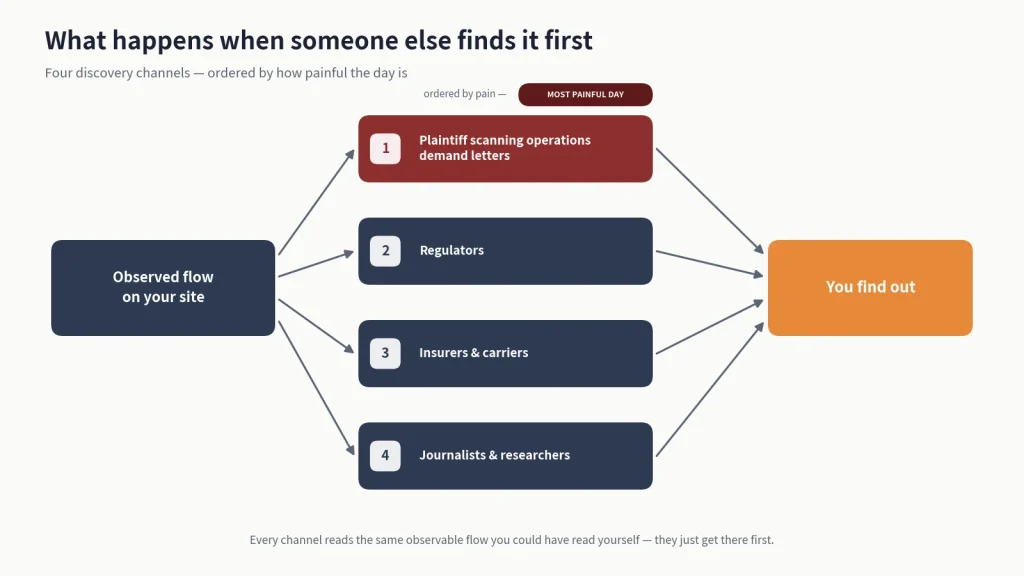
- Plaintiff scanning operations compare commercial sites across consent states, looking for differences in what gets transmitted before consent, after acceptance, after rejection, and after withdrawal. The recent surge in claims under California’s CIPA, a 1967 wiretap law (Penal Code §§ 630–638.55), follows this pattern. § 637.2 provides statutory damages of $5,000 per violation or three times actual damages, whichever is greater.
- Regulators act on complaints and conduct their own investigations. The FTC’s Avast case began with the gap between what users were told about privacy and what happened to their browsing data.
- Insurers and carriers ask about tracking controls during underwriting and renewals, and may ask for evidence rather than attestations.
- Journalists and researchers publish. The Klaviyo finding followed the responsible version of this path (disclosed, confirmed, remediated, then published) and still became a TechCrunch story within a day.
The plaintiff channel may soon narrow
SB 690, passed by the California Legislature on August 28, 2026, would remove the private right of action for pen-register and trap-and-trace claims under § 638.51 involving website and app activity, shifting enforcement to the Attorney General. If enacted, it would take effect January 1, 2027 and reach qualifying claims in actions commenced on or after January 1, 2025.
Status: As of this page’s last update, the bill has cleared the Legislature and is with the Governor, unsigned. We update this section when that changes.
The bill does not remove private claims under CIPA §§ 631 and 632, or potential claims under the federal ECPA and VPPA, other states’ wiretap laws, or applicable common-law theories. For § 631 claims, the details matter: the question is not simply whether tracking occurred, but what communication was intercepted, when, and what the third party received.
The claims may shift. They do not disappear. And none of this changes what your site actually sends.
Triaging a found flow
A found flow is not automatically a serious incident. Triage it on four factors:
- Data: A page-view event is not a password.
- Recipient: A contracted processor is not a bidstream.
- Consent state: Post-accept is not post-reject.
- Scope: One page is not the whole site.
Severity sits at the intersection. Sensitive data, an unapproved recipient, no valid consent, and broad scope warrant prompt investigation and legal review. A discovered flow may also be a reportable incident rather than a fix-and-forget bug.
Next steps
- Assess the exposure these flows create: data privacy risk.
- Check whether a discovered flow is reportable: what is a privacy incident?
- Understand the demand-letter wave: the CIPA guide, and the pixel-specific version at Meta Pixel wiretapping.
- HIPAA-adjacent? The tracking-rules matrix is at HIPAA-compliant tracking.
Find the data paths your paperwork misses → book a demo
FAQ
Is web tracking illegal?
No. It is legal by default and regulated at the edges. The EU requires consent before most tracking fires (ePrivacy/GDPR). California and a growing number of other states require honoring opt-outs and opt-out preference signals. Wiretap statutes add a separate layer when the contents of a communication are involved. In California, that layer is narrowing. SB 690 would strip the private right of action for CIPA pen-register claims over website tracking, and the Ninth Circuit spent 2025 tightening § 631. The legality table above maps which regime demands what.
What is cross-site tracking?
One identifier following one person across multiple websites: the same vendor’s code on Site A and Site B recognizes the same visitor, enabling profiles of online behavior and retargeted ads. The worked trace is in the mechanisms section.
Does rejecting cookies stop tracking?
It is supposed to. Whether it does is testable. Reject should suppress non-essential tags, but misconfigured consent mapping, hard-coded tags, and pre-consent firing are common findings. The four-state table shows what to check on your own site.
Does the consent banner actually control what fires?
It records choices; it does not prove behavior. A CMP log shows a visitor clicked “reject”. Only network capture shows whether the tags obeyed. The two records answer different questions.
What fires when a visitor does nothing at all?
Whatever the page loads by default, often the full tag stack, because many configurations treat “no choice” as “proceed.” The CMP records nothing. The wire may show everything. This is the least-tested of the four consent states.
How do we prove where our data goes?
By observing the wire, not citing the paperwork. A recorded session under each consent state (every request, its destination, its payload) is the evidence class regulators, carriers, and courts can act on. Policies and RoPAs describe intent. Capture describes behavior.
Does server-side tracking remove the need for a cookie banner?
No. Server-side collection changes where the processing happens, not whether consent and transparency duties apply. ePrivacy and GDPR attach to the processing, not the transport. What it removes is browser-level visibility, which is a governance problem of its own.
How do I prevent web tracking?
This page is written for website owners and operators, the organization doing the tracking, so the honest pointer is brief: privacy-focused browsers, blocking third-party cookies, and VPNs that mask your IP address all reduce consumer-side exposure. Your organization’s obligations are not met by your visitors defending themselves.
DISCLAIMER: This guide is for general informational purposes only and does not constitute legal advice. While we strive for accuracy, we make no warranties about the completeness or reliability of this information, and are not liable for any errors, omissions, or actions taken based on its contents. Consult a licensed attorney for guidance specific to your business.