
Google says it “makes no representations that Google Analytics satisfies HIPAA requirements,” offers no business associate agreement for it, and advises HIPAA-regulated customers to “refrain from exposing to Google any data that may be considered Protected Health Information.”
Blue Shield of California experienced this firsthand. Its own notice says Google Analytics (GA) “was configured in a way that allowed certain member data to be shared with Google’s advertising product” from April 2021 to January 2024. Blue Shield found it in February 2025.
If you run privacy, compliance, or digital marketing for a HIPAA-regulated organization, this guide helps you understand whether Google Analytics is HIPAA-compliant, which pages can safely use Google Analytics, and how to check what its tags send.
Key takeaways
- Google offers no BAA for Google Analytics and tells HIPAA customers to keep possible PHI away from it.
- Google’s instructions keep GA off logged-in pages and public care pages, whatever the 2024 court ruling did.
- By default, every GA4 event on a website sends the page’s URL and title. Optional events can also send search terms and form names.
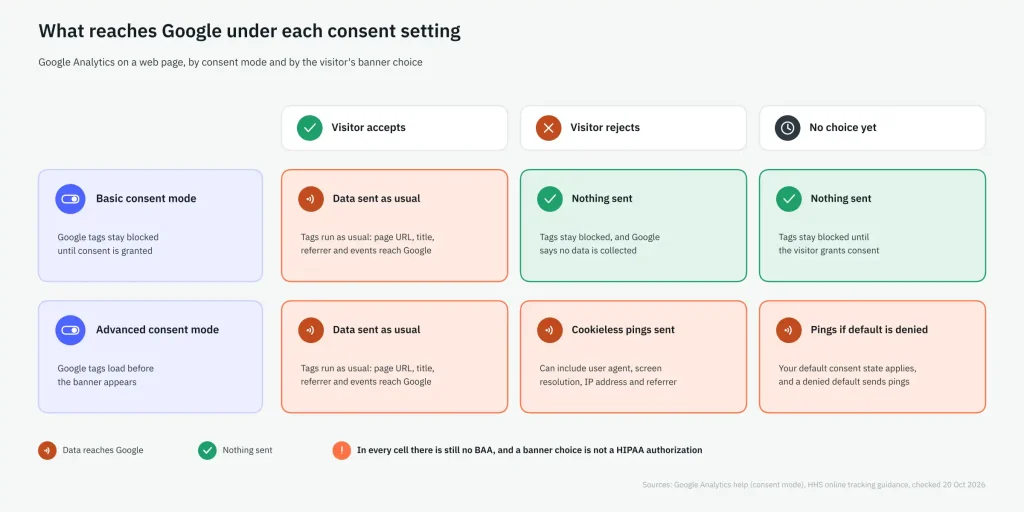
- IP settings, Consent Mode, and banners don’t supply a BAA, and advanced Consent Mode still pings Google after a “reject.”
- Checking your pages’ requests in every consent state shows what data leaves the browser. If you use a server-side container, you need to check it separately.
- If PHI has already reached GA, deletion options are limited. HHS will presume a breach unless you can prove otherwise.
- If you need to stop using GA, your main options are to use it only on cleared pages, de-identify data under a BAA, switch to an analytics vendor that signs a BAA, or remove it entirely. Each option requires a careful HIPAA compliance review.
Why isn’t Google Analytics HIPAA compliant?
Google won’t sign the business associate agreement (BAA) that the U.S. Department of Health and Human Services (HHS) requires before protected health information (PHI) reaches a tracking vendor. That holds for Google Analytics 4 (GA4) too. Without a BAA, HHS requires each individual’s HIPAA authorization before the disclosure.
The rule applies to HIPAA covered entities and business associates, and Google leaves it to each customer to decide whether it is a covered entity or business associate. Organizations outside HIPAA, such as some health apps, face other rules, which our HIPAA tracking guide covers.
Does Google sign a business associate agreement for Google Analytics?
No. Google Analytics, Google Tag Manager and Google Ads aren’t on Google’s HIPAA BAA lists. “The HIPAA BAA for Google Cloud includes the entire Google Cloud infrastructure,” Google says, along with the Workspace and SecOps services it names.
| Google service | On Google’s published HIPAA BAA lists? |
| Google Analytics (GA4) | No. Google “does not offer Business Associate Agreements” for it |
| Google Tag Manager | Not on the lists |
| Google Ads | Not on the lists |
| Listed Google Workspace services (for example Gmail, Drive, Meet) | Yes |
| Google Cloud infrastructure and listed products | Yes |
What does Google tell HIPAA-regulated customers to do?
Data that may be PHI must not reach Google from any page.
| What Google says | What it means on your site |
| HIPAA covered entities using Google Analytics “must refrain from exposing to Google any data that may be considered Protected Health Information (PHI).” | Nothing that could be PHI may reach Google, from any page or route. |
| Customers “must refrain from using Google Analytics in any way that may create obligations under HIPAA for Google.” | GA can’t be your PHI vendor. |
| “Authenticated pages are likely to be HIPAA-covered, and customers should not set Google Analytics tags on those pages.” | No GA on portals, logins, or account pages. |
| Unauthenticated pages related to providing health care services are more likely to be HIPAA-covered, and customers should not tag them. | No GA on public service, condition, or provider pages either. |
| Customers should work with legal counsel to identify pages that don’t relate to providing health care, and tag only those. | GA stays only where counsel clears the page. |
| Google points to HHS’s tracking guidance for what counts as PHI. | Google won’t define PHI for you. |
See what is considered PHI →
Which pages can keep Google Analytics?
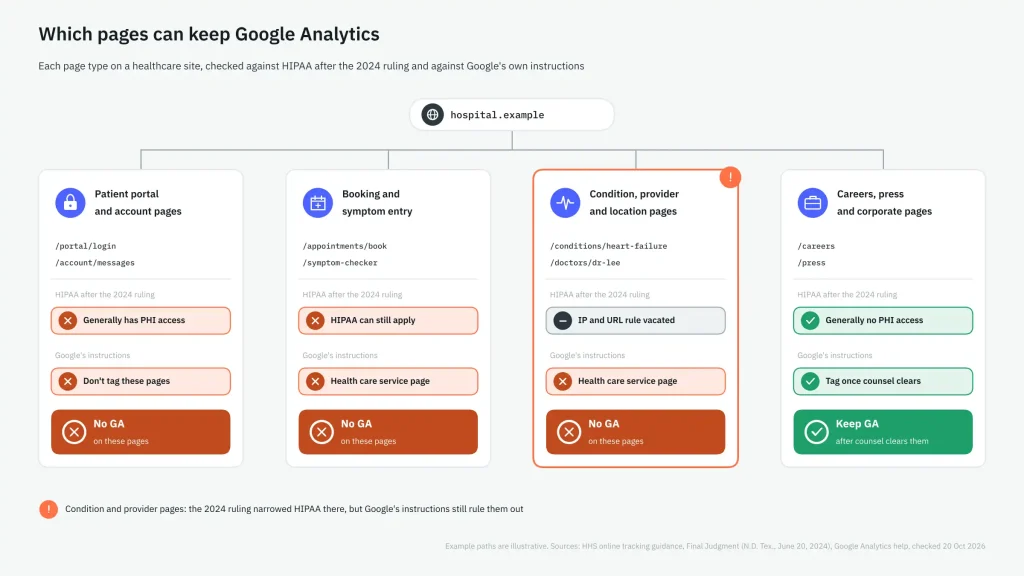
You can keep GA only on pages that meet both HIPAA requirements after the 2024 court ruling and Google’s instructions. That leaves pages unrelated to care.
| Page type | HIPAA after the 2024 ruling (HHS guidance) | Google’s instructions | Keep GA? |
| Patient portal, login and account pages | Tracking on authenticated pages generally has access to PHI | Don’t tag authenticated pages | No |
| Public pages where a visitor enters symptoms or appointment details | HIPAA can still apply, HHS says | Related to providing health care services | No |
| Public condition and provider pages | The vacated part covered visits to public pages addressing specific health conditions or providers | Related to providing health care services | No |
| Careers, press, investor and general corporate pages | Generally no PHI access, HHS says (its example: job postings or visiting hours) | Allowed once counsel clears them as unrelated to health care | Yes, after counsel clears them, while no possible PHI reaches Google |
What did the June 2024 ruling change for public pages?
In American Hospital Association v. Becerra, a federal court in Texas vacated HHS’s “Proscribed Combination”: an IP address tied to a visit to a public condition or provider page, treated as triggering HIPAA. HHS says it “is evaluating its next steps.”
For every tracker on the site, the page-by-page matrix is in our guide to HIPAA and online tracking.
What does Google Analytics 4 send to Google that can become PHI?
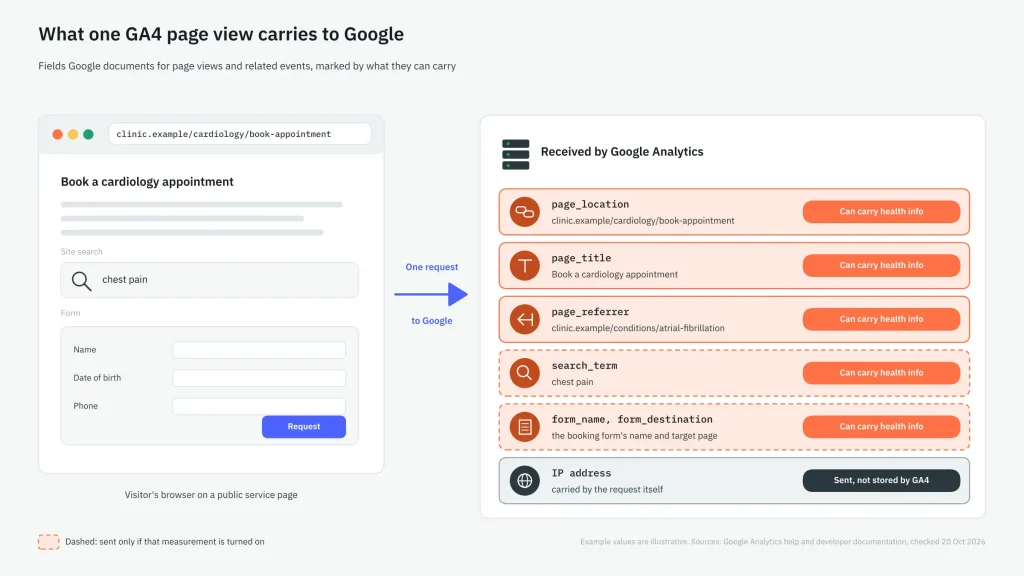
Every GA4 event on a website sends the page’s URL, referrer, and title by default. This means information about a condition or a booked appointment could reach Google through fields built for ordinary data collection.
| GA4 field | When it’s sent | How health information can ride in it |
| page_location (the page URL) | Every web event | A path that names a condition, a service, or a doctor |
| page_title | Every web event (defaults to the page’s title) | A title such as “Request a cardiology appointment” |
| page_referrer | Every web event | The health page the visitor came from |
| Page views on history changes | When enhanced measurement sends them (each browser history change) | Each step of a single-page booking flow, with its own URL |
| search_term | When site search measurement is on | What the visitor typed, read from URL parameters such as q, s, or search |
| form_id, form_name, form_destination | When form interaction measurement is on | Form names and destinations that reveal the purpose, for example, a screening request form |
| Google signals data | Only if Google signals is turned on | Activity tied to visitors signed in to Google, across devices |
| IP address | In the request itself | Reaches Google with every request, whether or not GA4 keeps it |
Form events describe the form itself, not what website visitors typed.
Is GA4 field data PHI?
Whether it can constitute PHI depends on the page. On public condition or provider pages, an IP address and URL alone were covered by HHS guidance that the 2024 ruling vacated. HIPAA can still apply to logged-in pages and to pages where visitors enter symptoms or appointment details, according to HHS.
Our guide covers when website data counts as PHI, including IP addresses.
Can you make GA4 HIPAA compliant with settings or server-side tagging?
No. GA4 has no IP setting to change, advanced Consent Mode still sends pings after a “reject,” and a banner isn’t a HIPAA authorization, so none of these supplies the missing BAA.
| Fix | What it changes | What it doesn’t change |
| “IP anonymization” | Nothing in GA4. It was a Universal Analytics setting, and Google says GA4 doesn’t log or store IP addresses | The request itself reaches Google, and there’s no BAA either |
| Consent Mode, basic | Blocks Google tags until the visitor consents | After “accept,” data flows as before |
| Consent Mode, advanced | Stops analytics cookies after a “reject” | Cookieless pings still go to Google, and they can include the user agent, screen resolution, IP address, and referrer |
| Cookie banner | Records the visitor’s choice | HHS says a banner asking visitors to accept or reject tracking is not a valid HIPAA authorization |
| Scrubbing URLs and parameters | Removes the values you thought to remove | Titles, referrers, form names, and new templates can still carry what you missed |
| GA4 data redaction | Removes email addresses, on a best-effort basis, and the query parameters you list | A condition name in a path or title isn’t an email or a listed parameter, so it stays. HTTP-header values such as the referrer aren’t evaluated, and it supplies no BAA |
| Server-side tagging or a de-identifying vendor | HHS describes one workable route: a vendor under a BAA de-identifies the data before anything reaches a vendor without one | Works only if the output meets HIPAA’s de-identification standard, whose safe-harbor identifiers include URLs and IP addresses. The forwarding step needs its own check |
How do you check what your Google Analytics tags actually send?
Open the network requests your pages send to Google Analytics. Review what each field contains for every page type and consent choice, and again after every site change.
- In your browser’s developer tools, open the Network panel. Filter for requests to Google Analytics, and open one to see its parameters.
- Check each field (page URL, title, referrer, search term, and form fields) for a condition, service, doctor, appointment, user IDs, or other identifiers.
- Test logged-in and logged-out pages, booking and intake flows, symptom checkers, condition and provider pages, and site search results.
- Repeat these checks after accepting, after rejecting, and when no choice is made. With advanced Consent Mode, also check the pings sent after a “reject.”
- Click through single-page flows, because each browser history change can send its own page view with its own URL.
- If a server-side container sits in between, the browser request shows only the first hop, so check what the container forwards to Google as well.
- Document the findings in your HIPAA Risk Analysis, as HHS recommends for tracking technologies. Repeat the check after every release, since new templates, tags, or third-party scripts can change what gets sent.
Our HIPAA tracking audit covers the same check for every tracker, step by step.
A manual check shows one browser on one day. MELURNA is built for the same question across your patient journeys: it identifies “patient and health-related signals moving through forms, apps, analytics, and embedded services” and tests consent states.
What should you do if PHI has already reached Google Analytics?
Stop collecting data on the affected pages, keep evidence of what was sent, file GA4 data-deletion requests (knowing their limits), check for copies outside GA’s reports, and run a breach assessment, since HHS presumes a breach.
- Remove or reconfigure the tags on the affected pages, and turn off Google signals in Admin under Data collection if it is enabled.
- Before you delete anything, record which fields carried what data, on which pages, and since when.
- File data-deletion requests, keeping their limits in mind. Google’s deletion page says deleted text becomes “(data deleted),” the events still count, and numeric parameters are not deleted. Data must be more than 12 days old, processing takes 7 to 63 days, and a completed deletion cannot be reversed.
- Check copies outside GA’s reports. Google’s deletion page doesn’t mention BigQuery exports, so find and delete those copies yourself, and review linked products such as Google Ads.
- Run the breach assessment, because HHS presumes a disclosure with no BAA and no Privacy Rule permission is a breach of unsecured PHI unless you can show a low probability that the PHI was compromised. Our privacy incident vs. breach explains where the line sits.
Has anyone faced penalties or lawsuits over Google Analytics?
Two hospital class actions that mention Google Analytics, against Sutter Health and Concord Hospital, have reached settlements, and regulators have named it in writing. Blue Shield of California has disclosed that member data reached Google through its GA setup. None of these cases resulted in a regulator’s penalty for a HIPAA violation.
| Who | When | What happened | Google Analytics’ role |
| Federal Trade Commission (FTC) and HHS Office for Civil Rights (OCR) | Announced July 20, 2023 | Joint letter to about 130 hospital systems and telehealth providers about online tracking | Named, with the Meta/Facebook pixel, as an example tracking technology |
| Blue Shield of California | Notice dated April 4, 2025 (sharing from April 2021 to January 2024) | Member notice of data shared with Google’s advertising product | Its GA setup allowed member data to reach Google Ads |
| Doe v. Google LLC | Order of June 6, 2025 | Proposed federal class action against Google in the Northern District of California. The court granted Google’s motion to dismiss the second amended complaint in part and denied it in part | Plaintiffs allege Google source code on health care provider websites, including Google Analytics, intercepted health information (July 2024 opinion) |
| Jane Doe I and Jane Doe II v. Sutter Health | Final approval granted March 6, 2026 | Class action in California state court, $21.5 million settlement fund. Sutter denies the claims | The settlement notice releases claims arising “through use of Google Analytics, the Meta pixel, other cookies, other pixels, web beacons” |
| Branson v. Concord Hospital Inc. | Final approval hearing set for November 3, 2026 | Class action in New Hampshire, $800,000 proposed settlement fund. The court hasn’t decided who would win | Alleged tracking, including Website Pixels such as Google Analytics and Geonetric |
Other hospital tracking cases may involve GA. We listed where its court papers or official notice name the product.
“OCR continues to be concerned about impermissible disclosures of health information to third parties,”
OCR Director Melanie Fontes Rainer said in the July 2023 announcement. HHS goes further. It says OCR
“is prioritizing compliance with the HIPAA Security Rule in investigations into the use of online tracking technologies.”
What can you use if Google Analytics has to go?
You can use an analytics platform that signs a BAA, de-identify data through a vendor under a BAA before it reaches Google, keep GA only on cleared pages, or remove it. Each route carries its own compliance risk, so check whichever one you choose.
| Route | When it fits | Measurement you lose | What still needs checking |
| Keep GA only on pages counsel clears | Measurement lives mostly on corporate pages | Service, condition and booking pages | Cleared pages stay clean as templates change |
| De-identify through a vendor under a BAA before data reaches Google | You want GA reports to continue | Under the safe harbor method: URLs, IP addresses, all date elements except year, and geography smaller than a state | What the vendor forwards |
| Analytics provider that signs a BAA | You need measurement on clinical pages | A migration, and GA’s links to other Google products | The BAA covers the plan you buy, and its tags send only what you expect |
| Individual HIPAA authorization | Each visitor has signed a valid HIPAA authorization | Nothing under HIPAA, where valid authorizations exist | Each authorization meets HIPAA’s requirements. Google’s instructions still bar PHI in GA, authorization or not, so this route needs a vendor whose terms allow it |
| Remove analytics from the affected pages | The flow has to stop now | All measurement on those pages | Data already sent: the deletion and breach steps apply |
Next steps
- See how Meta Pixel lawsuits have played out for healthcare websites.
- Check whether session replay is recording your patient flows.
- Run the HIPAA tracking audit across every tracker on your site.
- See how MELURNA finds patient data moving through forms, analytics, and embedded services on healthcare sites.
DISCLAIMER: This article is for general informational purposes only and does not constitute legal advice. While we strive for accuracy, we make no warranties about the completeness or reliability of this information, and are not liable for any errors, omissions, or actions taken based on its contents. Consult a licensed attorney for guidance specific to your business.