
A HIPAA tracking technologies audit is a privacy and compliance assessment that reviews how tracking technologies on digital properties collect, process, share, or disclose protected health information (PHI) to identify compliance risks, unauthorized third-party data disclosures, and potential HIPAA violations.
Most HIPAA tracking checklists say to audit your pixels, but they rarely explain how to do it. They don’t show you what to look for, how to spot data leaks, what to ask vendors, or how to document your audit.
The stakes keep compounding. Regulatory and litigation exposures run on separate tracks, and one tag can create both. Kaiser Permanente agreed to pay up to $47.5 million because tracking code on its portals and apps exposed data from about 13.4 million people. These cases are state wiretap and contract claims, not HIPAA enforcement. HIPAA has no private right of action (HIPAA Journal).
This guide explains the method and technical inventory of tracking code on your websites and apps. It is not an OCR compliance audit or Security Rule audit logging.
Why now? The tracking-technologies bulletin from HHS’s Office for Civil Rights (OCR) (December 1, 2022; revised March 18, 2024) put websites and mobile apps (SDKs included) in scope. The settlement wave turned “we never looked” into an expensive answer. The June 2024 AHA (American Hospital Association) ruling vacated one theory about public pages. Nothing else.
If you want to know why tracking creates HIPAA exposure at all? Read the HIPAA-compliant tracking guide.
Key takeaways
- A tracking audit observes what pixels, tags, and SDKs actually send, not a Security Rule audit-log review.
- “Regularly” is already in the regulation (§ 164.308’s activity review). MarinHealth adds pixel removal and no-reinstall-without-consent terms. Cadence is a legal expectation, not a best practice.
- Crawl rendered pages, not containers. The dangerous tags are the ones you didn’t install.
- The leak is always in a field: dl, dt, Referer, not a headline.
- Ask every vendor the fourth-party question; your BAA’s § 164.314(a)(2)(i)(B) flow-down term already entitles you to the answer.
- Seed canaries instead of chasing parameter names. Where a tracker can’t be removed, break the identifier-plus-context combination at the source.
- Dated evidence artifacts and a rehearsed drill are what make the audit defensible.
Things before starting HIPAA tracking technologies audit
1. Scope it under counsel
This procedure generates written records of suspected violations and a log of vendors who didn’t reply. In active tracking litigation, those are exhibits. Routing the engagement through counsel lets the workpapers be marked privileged.
2. Agree who owns each stage
A compliance lead owns classification, vendors, and the register; a web engineer owns the captures and the chain walk (tracing which script triggered which request). Split the steps along that line on day one or Step 3 stalls. Authenticated surfaces need a maintained synthetic test account (never real patient records on any surface). Creating one in a production portal is a governed act: a ticket, not a task.
3. Open the CSP (Content Security Policy) collector ticket on day one
Step 3’s production method needs a header change, a collector endpoint, and weeks of accumulation- the long pole. Every other step runs while it fills. Budget two to five working days for the collector and header work at a single-property organization.
4. Surface discovery, because “our website” is never one site
Subdomains multiply: campaign microsites, a careers portal, a retired event page still serving a 2019 tag manager. The free discovery instrument is Certificate Transparency. TLS certificates are publicly logged as they’re issued (RFC 6962), and crt.sh indexes the logs. Query every hostname ever certificated under your domain:
https://crt.sh/?q=%25.yourdomain.org&output=json
Pull the name_value fields (the Subject Alternative Names), deduplicate, then check which hosts still resolve and serve content. (crt.sh is often overloaded and returns 502 errors; retry rather than assume the query is wrong.) Cross-check against your DNS zone export, Search Console properties, CDN/WAF hostname configs, marketing’s campaign-domain list, and app-store listings. Output artifact: a surface register (every host, its owner, live/dead status). Honest limit: CT logs only contain certificated hosts. An internal staging hostname or IP-only microsite won’t appear. That’s what the DNS and CDN cross-checks are for.ce rule
Every finding gets a captured artifact, dated, with capture conditions recorded (geography, consent state, authenticated or not): screenshot, HAR (HTTP Archive) export, and payload note.
Strip Cookie, Authorization, and Set-Cookie headers from HARs. An unscrubbed authenticated HAR is itself ePHI. Keep the artifacts. HIPAA requires Security Rule documentation be retained six years “from the date of its creation or the date when it last was in effect, whichever is later” (45 CFR § 164.316(b)(2)(i)).
Access checklist before you start: tag-manager admin, CMS template access, a browser with dev tools, and a test device with your app installed.
Phase 1: See every surface you actually own
Most audits fail here by auditing the container instead of the runtime. The tag you installed loads other tags. Past agencies’ work survives in templates, and vendors inject scripts you never approved. So you run discovery three ways. The disagreements are the deliverable.
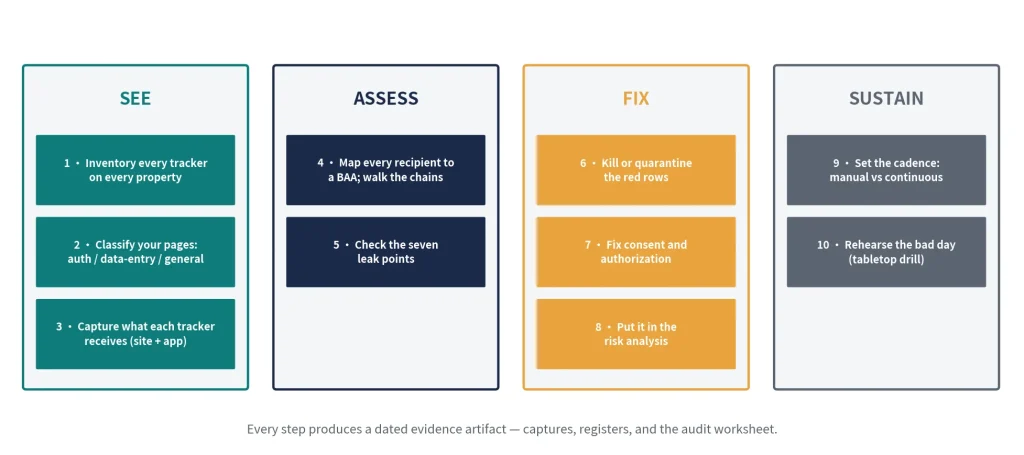
Step 1: Inventory every tracker on every property
Three sources build the website inventory, because each one sees what the others miss:
- The tag-manager export (A)
- A rendered crawl (B)
- A report-only Content Security Policy watching real users in production (C).
The app is a separate surface no web source sees, so it gets its own pass.
Source A: the GTM container export (approved intent)
TOOL: Google Tag Manager’s Container Version export, pulled through the Tag Manager API (accounts.containers.versions; the ContainerVersion resource carries the full tag, trigger, and variable arrays). Pull every version and workspace, not just the live one. Dormant tags matter (the reconciliation table below). The UI’s Versions tab works for a one-off look, but only the API gives you a scriptable export of every version and workspace.
Where it breaks: an export is what was supposed to deploy. It can’t see hardcoded template tags, vendor-injected scripts, second containers, or anything outside GTM.
Source B: a rendered headless crawl (runtime reality)
TOOL: a headless crawl – Playwright or Puppeteer driving Chrome with the Chrome DevTools Protocol attached (the Step 3 capture harness doubles as your discovery crawl). Crawl rendered pages, not source HTML. The tracker population only assembles after scripts execute.
Where it breaks: the crawl sees only the conditions you reproduced. Step 3’s capture matrix widens them.
Source C: CSP Report-Only in production (production reality)
TOOL: Content-Security-Policy-Report-Only with a reporting endpoint. The browser reports every script origin that executes for real users and blocks nothing. It takes a header change plus weeks of accumulation, so the full method gets its own subsection: Source C, after Step 3.
The app (separate surface)
SDKs are compiled into the build; none of the three sources sees them. Your SDK list comes from the build itself and the Step 3 network trace below.
Output artifact: A tracker inventory per property, annotated by discovery source.
Step 2: Classify your pages
Sort every URL into three classes: authenticated (portal, dashboard), data-entry (scheduling, symptom checker, registration, payment), and general (careers, hours, condition education) – call them T1, T2, and T3. The verdicts per class (what can run where, under what conditions) live in the companion guide’s decision matrix. Don’t reinvent them. At scale, pattern-match URLs against your service-line taxonomy (if your CMS navigation has one), then spot-check the classifier on a random sample and report the error rate. An unmeasured classifier is a guess.
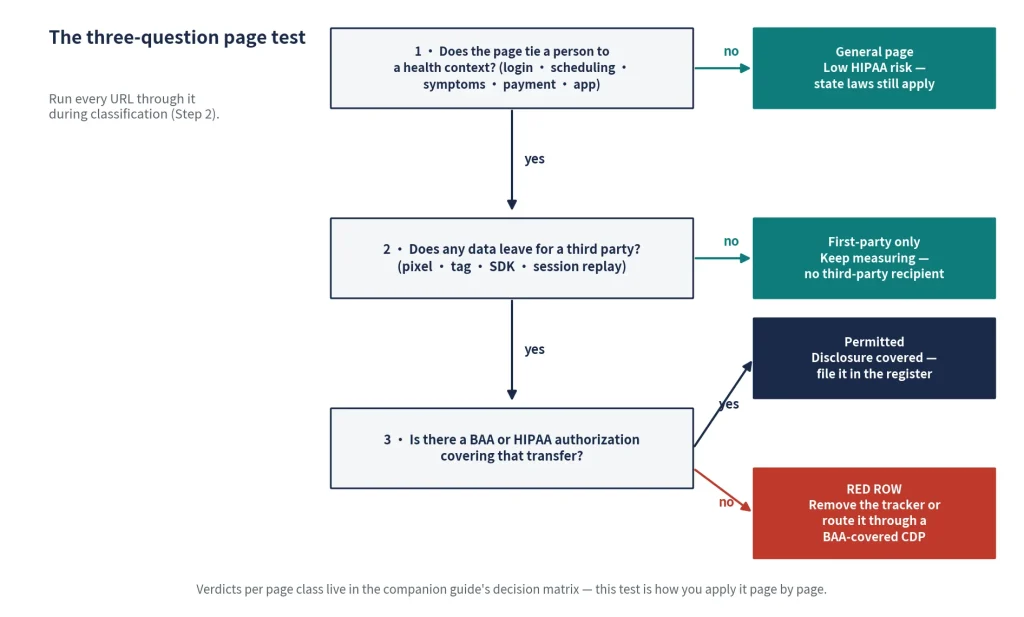
Output artifact: the page inventory by class.
Step 3: Capture what each tracker receives (website + mobile app)
Captures are the audit’s raw material. Record what each tracker actually receives, on the website and in the app.
Website:
TOOL: headless Chrome driven over the Chrome DevTools Protocol (CDP; Playwright/Puppeteer attach it for you), or Chrome DevTools’ Network panel by hand for small sites. Four procedure rules:
- Clean browser profile, no extensions. In one capture run while drafting this article, 45 of 68 requests came from a single Chrome extension – noise indistinguishable from third-party scripts.
- Sample by page template, not URL count (tags deploy per template), plus every URL with a form. Stopping rule: ten consecutive pages with no new script domain.
- Capture across consent states (rejected / accepted / no-banner) and auth states. A fresh context keeps consent-gated tags silent – the difference between finding six vendors and sixty.
- Tell your SOC (security operations center) first and get the crawler allowlisted: a headless crawl of production trips bot management and looks like credential stuffing. Keep it read-only. Authenticated surfaces get the synthetic test account.
COMMAND/API: per page, save both a HAR export and the raw Network.requestWillBeSent events. Standard HAR has no initiator field. Only DevTools’ non-standard _initiator export carries it, and Playwright/Puppeteer harnesses write none. The raw events (or a DevTools HAR export, sanitized or header-intact per Chrome’s Network reference) feed Step 4’s chain walk, correlated on requestId. OUTPUT: one capture set per page, named with its conditions: scheduling_chrome_us_consent-default_auth-synthetic.har, not capture1.har. Geo-redirects and A/B buckets also change what fires, so a capture without recorded conditions can’t be compared later.
Mobile app:
SDKs are invisible to everything above, so trace the app directly. Route a test device through a local HTTP interception proxy (mitmproxy’s documentation covers proxy setup and certificate installation), replay a full patient journey (login, schedule, view results), and log every request each SDK fires.
Certificate pinning breaks this silently. Use a debug build with pinning disabled (or a bypass on a rooted test device) and confirm you can see traffic before trusting a quiet log. Watch the advertising identifiers: IDFA/AAID don’t clear like cookies. They persist per device until the user resets or revokes them in OS settings, per Apple’s and Android’s documentation.
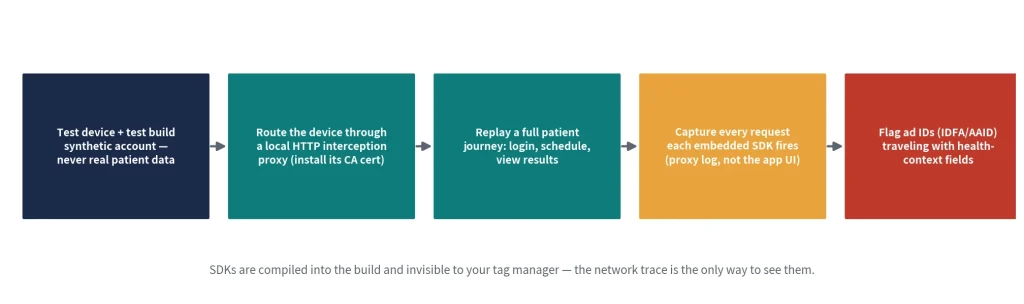
Output artifact: payload notes per data-entry page (and per app flow).
Source C: CSP Report-Only in production
The third source runs in production and sees real users: deploy Content-Security-Policy-Report-Only with a tight policy and a reporting endpoint – the browser reports every violation and blocks nothing. You collect every script origin that executed for real users, across every geo, consent state, and device (MDN):
Reporting-Endpoints: csp-audit="https://collector.internal.example.org/csp"

Content-Security-Policy-Report-Only: default-src 'self';

  report-uri https://collector.internal.example.org/csp;

  report-to csp-audit
(Send each as a single header line; folded here for readability.)
The details that decide whether this works:
default-src,not script-src. Data-carrying requests aren’t scripts – beacons rideconnect-srcandimg-src, and tracking pixels are 1×1 images. A script-only policy is blind to exactly what §5 inspects.- Both reporting directives.
report-totakes an endpoint name fromReporting-Endpoints, not a URL. Browsers supportingreport-toignorereport-uri, so shipping both covers older browsers without double-counting. - Two payload shapes.
report-uripostsapplication/csp-report, a single object with hyphenated keys (blocked-uri,document-uri);report-topostsapplication/reports+json, an array with camelCase (blockedURL,documentURL). A collector built for one silently drops the other. - Cross-origin reports are truncated, and that’s fine here. Reports truncate cross-origin blocked URIs to the origin (scheme/host/port), per MDN’s report-uri reference. Origin is exactly this audit’s join key, so the truncation costs nothing.
- Self-host the collector, or sign a BAA with it. Reports carry
document-uri, the full URL of the page where the violation fired. On a portal, that can be a lab-results path. Sending it to a third-party reporting service creates a new disclosure in the middle of a HIPAA audit.
Where it breaks
It’s a response header (no <meta> equivalent), so you need header control at the CDN or server. The collector needs deduplication, and volume on a busy site is real. And report-only is a discovery instrument here, not an enforced control.
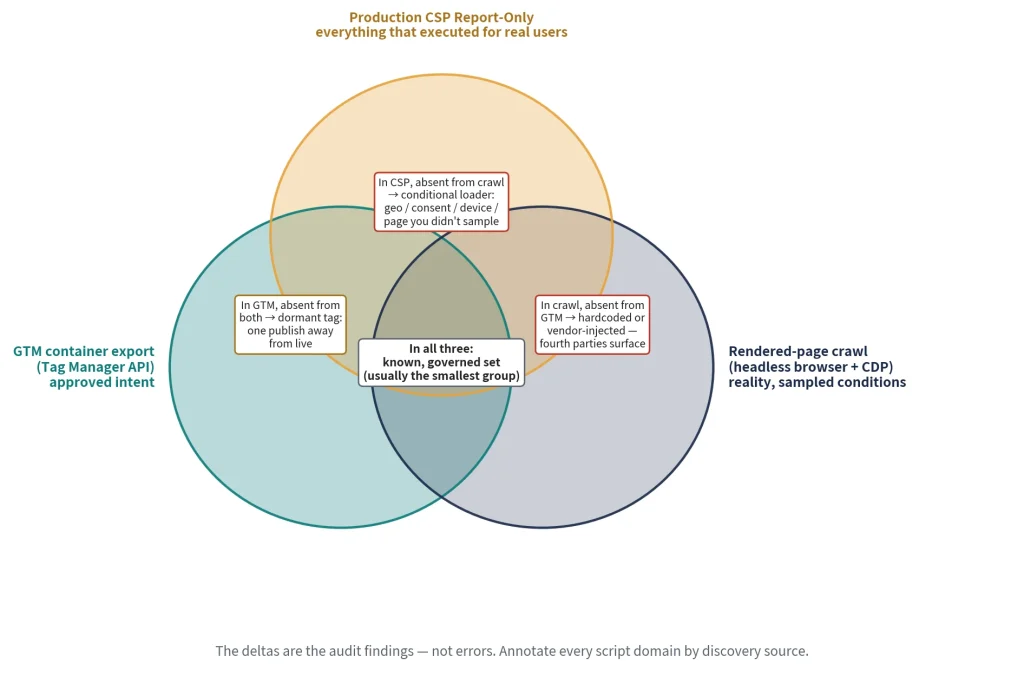
Reconciling the sources – the deltas are the findings
Two preconditions before anything compares.
- Fix a window: CSP accumulates over weeks, the crawl is a point in time, the GTM export is historical – run all three inside one agreed window and date-stamp every register, or your deltas are timing artifacts.
- Normalize to a join key: GTM emits tag configurations (a “Google Ads Remarketing” tag, not a domain), the crawl emits request URLs, CSP emits origins: map tag types to expected domains before anything lines up (Meta Pixel →
connect.facebook.net; Google Ads Remarketing →googleads.g.doubleclick.net).
| Observation | Meaning |
| In CSP reports, absent from crawl | Conditional loader – geo, consent state, device, or a page you didn’t sample |
| In crawl, absent from GTM | Hardcoded or vendor-injected – this is where fourth parties (vendors your vendors load) surface |
| In GTM, absent from both | Dormant tag – or fires on an interaction you never triggered. Still a live risk: a dormant tag is one publish away |
| In GTM + crawl, absent from CSP | Your instrument is wrong, not the page – the policy allowlisted the origin, the collector dropped reports, or it loads under a directive you didn’t set. Fix Source C before trusting any other row |
| In all three | Your known, governed set – usually the smallest group |
The deltas are the audit findings, not errors – except the fourth row, which is.
Output artifact: a script-domain register annotated by discovery source.
Phase 2: Map every recipient, check every leak point
With captures in hand, the work turns from collection to attribution. Who receives the data, and what each request actually carries.
Step 4: Map every recipient to a BAA and grade the vendor
Build the vendor register from your captures:
every receiving domain → vendor → BAA status → scope → risk grade.
Two register rules:
1. Scope, not existence:
“Does the BAA cover the features you actually use, including the script’s behavior on authenticated pages?” An existing BAA for a different product from the same vendor is not coverage.
2. The fourth-party column:
“What does your script load?” The tag you installed pulls in scripts from vendors you never contracted with. Each hop inherits your page’s full context: URL, referrer, identifiers.
The regulation anticipated the chain: a business associate may let a subcontractor create, receive, maintain, or transmit ePHI on its behalf “only if the business associate obtains satisfactory assurances… that the subcontractor will appropriately safeguard the information” (45 CFR § 164.308(b)(2)).
You’re the covered entity, your analytics vendor is the business associate, and the ad partner their script loads is functionally the subcontractor. The question isn’t paranoid. It’s an assurance your vendor already owes.
Proving the chain, manually: Chrome DevTools → Network panel → Initiator column. Its labels (Parser, Script, Redirect, Other) are DevTools UI labels, not protocol values. The CDP initiator enum is parser, script, preload, SignedExchange, preflight, FedCM, other, with no redirect (CDP Network domain).
Redirects surface differently below. Script is the one that matters. Hovering shows the stack trace, and the top call frame is where the request was actually triggered.
Programmatically: subscribe to Network.requestWillBeSent, and where initiator.type is "script", read initiator.stack.callFrames[0].url, the script that made the call. Four handling notes:
- Stacks are optional: parser-initiated requests carry none. When
callFramesis empty, walkstack.parent, the asynchronous trace. Async collection defaults to off.Debugger.setAsyncCallStackDepthenables it (the one legitimate Debugger-domain use here) and is not required for basic initiator stacks, which populate withNetwork.enablealone. (The protocol reference still says Debugger is required for stacks; on current Chrome that note is stale, but verify against your Chrome version.) - Cross-origin iframes need
Target.setAutoAttachwithflatten: true, or their network events never reach you. And ad-tech fourth parties live in iframes. - Redirect hops surface as a second
requestWillBeSenton the samerequestIdwithredirectResponsepopulated: build chain edges fromrequestIdcontinuity as well as call frames, or you drop every redirect hop. - Judge by origin, not depth. A GTM Custom HTML tag injecting a vendor you approved reads as depth 2. An iframe-injected vendor can appear at depth 1. Depth sorts; origin decides.
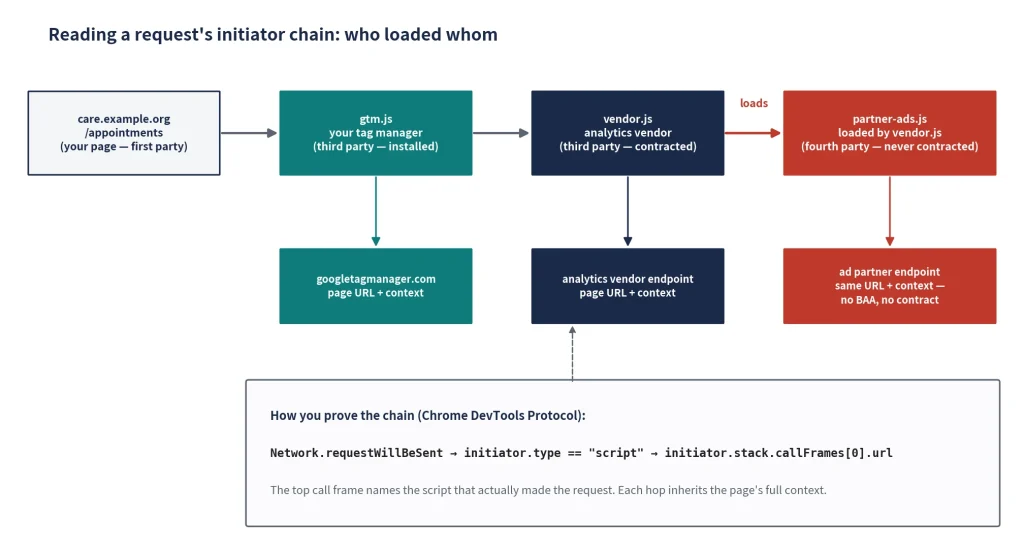
Where it breaks
Two honest limits.
- Chains vary by session, geography, and consent state (why Step 3 captures a matrix: one capture is an anecdote).
- Attribution has hard cases: CDN-hosted libraries and white-labelled vendors resist script-origin attribution. Attribute those by payload destination: the receiving endpoint, not the sending script.
Output artifact: chain graph + vendor register with the fourth-party column filled.
Step 5: Check the seven leak points against your captures
The companion guide’s decision-matrix section owns the seven leak points (URL paths and query strings, referrer headers, form-field capture, session replay, click-event parameters, hashed-email uploads, server-side streams). This page owns the test procedure. For each leak point:
- Find the candidate requests in your Step-3 captures (filter the HAR to third-party requests; DevTools has a built-in 3rd-party filter).
- Read the payload per § 5’s field guide: URL, referrer, POST body, cookies.
- Record pass/fail with evidence: the request ID and HAR filename go in the worksheet row.
Output artifact: the leak-point worksheet, pass/fail, with an evidence reference per row. A fail without a capture reference is an opinion. A fail with one is a finding.
What a leak actually looks like
You audit at parameter level, not host level. “Requests went to google-analytics.com” tells you nothing. What the request carried is the finding. Four places to look, in order of how often they carry the problem. The reference anatomy is the Google Analytics 4 (GA4) collect request (field names observed against a live /g/collect capture while drafting this article, and the Measurement Protocol reference documents the transport):
dl: document location. The full page URL. On a scheduling URL like/appointments/orthopedics?reason=…, the care context travels in plain text.dt: document title. “Book an Appointment – Orthopedics | Example Health” is a care-context string sent as a parameter.dr: document referrer. Present when the visitor arrives from another page, and can carry the originating query from your own internal search.- The
Refererrequest header, with a caveat. The browser attaches it to third-party requests regardless of tag configuration, which is why teams that sanitize tag payloads miss it. But Chrome’s default has beenstrict-origin-when-cross-originsince 2020: cross-origin, the header carries your origin only, not the path (MDN: Referrer-Policy). A full-URL Referer leaks cross-origin only under laxer policies (no-referrer-when-downgradeandunsafe-url, both common on older templates) or to same-origin endpoints, which matters when a vendor is proxied off a path on your own origin. A vendor serving from your subdomain is still cross-origin for Referer purposes (it gets origin only), though it does receive your domain-scoped cookies. Check theReferrer-Policyheader, any<meta name= "referrer">, andreferrerpolicyattributes on vendor tags before scoring this row.
Then the rest of the body: query strings (appointment IDs, campaign parameters, internal search terms), POST bodies on form-adjacent events, cookie headers with persistent identifiers.
The inspection rule: you are not looking for a field called “diagnosis.” You are looking for an identifier traveling alongside a URL or title that reveals care-seeking.
The method that works on every vendor: seed canaries.
Parameter names differ across vendors and change without notice, so don’t memorize them. Plant markers. During a controlled capture, type synthetic-but-recognizable test values (a canary email, phone, and name) into every form field, then grep every captured request (URL, POST body, and headers, base64- and URL-decoded first) for the canaries, your page paths, and your <title> strings. Anything that comes back is a transmission you can prove.
Coordinate before submitting: a form post on production dispatches real schedulers and pollutes conversion data, and on a health page the submission itself can be a disclosure. It sends your session identifiers to every tag that fires. Agree a test-marker value and a deletion path with the form’s owner first.
The three worked payloads below are synthetic, illustrative, and anchored to the contexts where the analysis is settled: scheduling, authenticated, and app surfaces.
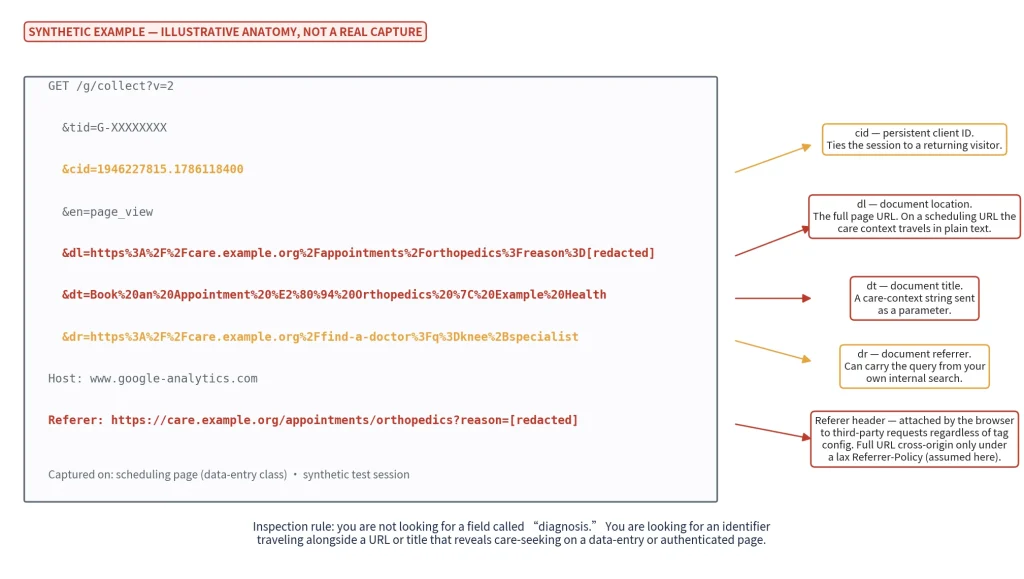
Payload 1: the scheduling-page pixel event (above)
Problem fields: dl (scheduling URL + reason parameter), dt, and (where the page ships a lax Referrer-Policy) the Referer header repeating the full URL.
Fix class: remove the tag from data-entry pages, or route measurement through a BAA-covered CDP (customer data platform) that strips the context.
Note what you don’t need: any theory about public pages – a scheduling page collects PHI when someone types.
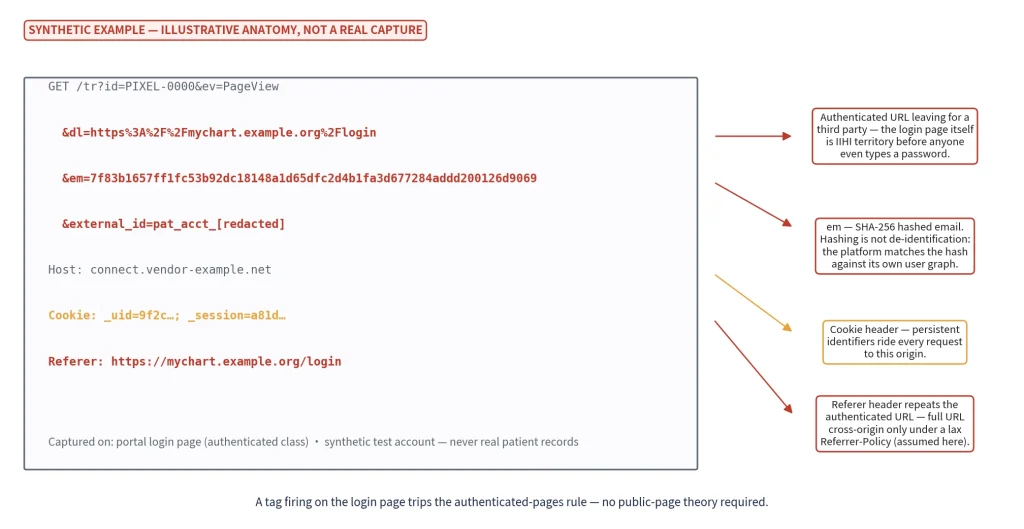
Payload 2: the portal-login request (above)
A third-party tag fires on the login page.
Problem fields: the authenticated URL in dl (and Referer under a lax policy), the hashed email (em), and the persistent cookies. On em: hashing is not de-identification for the sender. The receiving platform matches the hash against its own user graph.
Fix class: kill it. Authenticated surfaces are BAA-covered vendors only, full stop. If a session-replay tool appears anywhere in these captures, that row is red by default – replay is the worst offender per byte in this class.
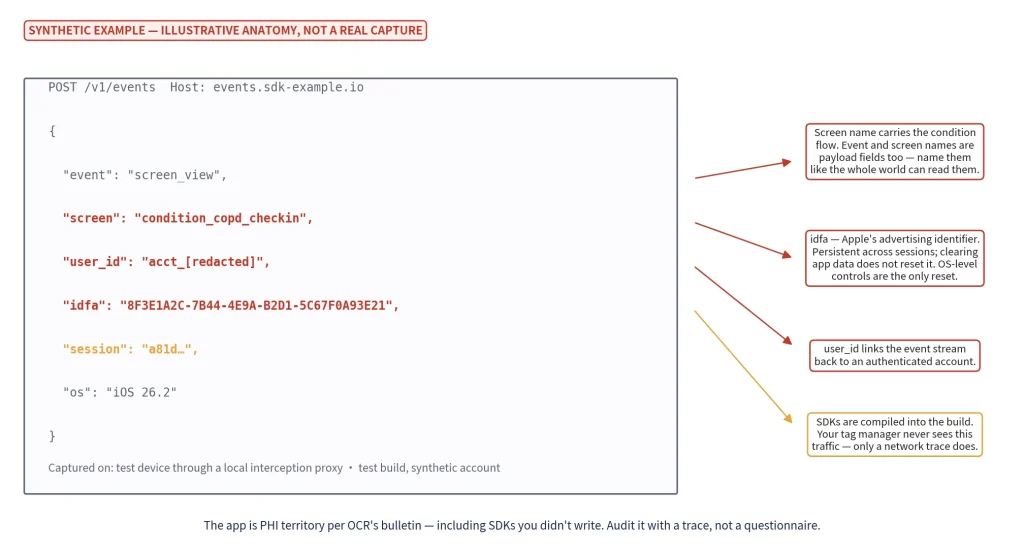
Payload 3: the in-app SDK event (above)
An analytics SDK posts a screen_view where the screen name names a condition flow, bundled with the IDFA and an authenticated user_id.
Problem fields: screen name (event and screen names are payload fields: name them like the world can read them) and the ad ID, which persists until the user resets it at the OS level.
Fix class: BAA-covered SDK, or rename and strip before it leaves.
Phase 3: Fix, authorize, document
The back half of the audit turns findings into fixes: dispose of every red row, repair authorization where it’s needed, and file the results where the Security Rule already looks.
Step 6: Kill, route, or break the combination
Every red row from Step 5 gets one of three dispositions:
- remove the tracker from that page class
- route it through a BAA-covered CDP that strips identifiers before forwarding (the companion guide’s allowed-patterns section covers the architecture); or, where the tracker can’t be removed
- break the combination at the source: strip or parameterize URLs and form values before any tag fires, redesign paths and
<title>tags so they don’t state conditions, tightenReferrer-Policy. If the identifier never travels with care-seeking context, the disclosure never assembles.
One caution on “route,” straight from OCR’s bulletin: a vendor promising to strip or de-identify PHI after receiving it is not remediation. Disclosure of PHI to a vendor without authorization requires a signed BAA and an applicable Privacy Rule permission at the moment of disclosure. The contract and the strip step must precede the data.
Then the step everyone skips. Capture again, re-run the Step-3 harness on the affected pages, and file the after-capture next to the before-capture.
Output artifact: change tickets + post-change captures.
Step 7: Fix consent and authorization
Your cookie banner is privacy tooling, not a HIPAA control. OCR’s bulletin is explicit that banners aren’t valid HIPAA authorizations, and a banner tells you nothing about what fires behind it anyway. Where a disclosure genuinely needs authorization, 45 CFR § 164.508 defines the document (core elements, expiration, revocation rights), and building that flow is counsel’s job, not yours.
Your audit deliverable for Step 7 is the list of surfaces that need it, with the captures that show why.
Step 8: Put it in the risk analysis
The Security Rule requires “an accurate and thorough assessment of the potential risks and vulnerabilities” to ePHI (the risk analysis) and procedures “to regularly review records of information system activity” (45 CFR § 164.308(a)(1)(ii)(A) and (D)). Your tracking stack belongs in both:
- Asset list: the tracker inventory and surface register from Steps 1–2.
- Activity review: tag-manager change logs and publish events, reviewed on the cadence you set in Step 9.
- Access review: who holds publish rights in the tag manager and CMS – every past agency account still on the container is a finding.
This mapping is what OCR expects, not optional packaging. The bulletin directs regulated entities to address tracking technologies in their risk analysis and risk-management processes. It states that OCR is prioritizing Security Rule compliance in its tracking-technology investigations.
Forward-looking signal: the January 2025 Security Rule NPRM (notice of proposed rulemaking) (90 FR 898) would require a written technology-asset inventory and a map of how ePHI moves (a proposed rule, not final or binding). If it lands in anything like that form, this inventory stops being good practice and becomes the deliverable.
File the whole package per your documentation policy. The six-year retention rule applies to it.
Phase 4: Sustain continuous readiness
Step 9: Set the cadence: manual quarterly vs continuous
How often is “regularly”? The Security Rule sets the floor: regularly review records of information system activity (§ 164.308(a)(1)(ii)(D)), and review documentation “periodically, and update as needed, in response to environmental or operational changes” (§ 164.316(b)(2)(iii)): periodic, and triggered by change.
MarinHealth’s settlement sets the direction: pixel removed, no re-installation absent notice and consent (settlement site).
Practical translation: quarterly at minimum, and on every major release, with new tags passing the page-class matrix before they ship.
The honest problem with quarterly: a manual sweep tells you what fired in May, not what started firing in June: vendor config changes, agency publishes, and new microsites all land between sweeps.
Continuous client-side monitoring exists to close exactly that gap:
| Manual quarterly audit | Continuous monitoring | |
| Coverage | Sampled pages, sampled conditions | Every page, every session, all conditions |
| Fourth-party chains | One chain walk per capture; vendors your vendors load rotate between sweeps, invisibly | New vendor-injected scripts and hops flagged as they appear |
| Staleness window | Up to ~3 months + release lag | Near-real-time on change |
| Effort | Days per quarter, per property | Setup once; alerts on drift |
| Evidence quality | Deep captures, human-graded payloads | Change detection; deep dives still manual |
Server-to-server trap: client-side observation sees pixels and event transport in the browser – it does not see server-to-server flows (Meta’s Conversions API and similar). Close that gap the old way: vendor contracts and log review.
A hybrid is the sane default for mid-market. The continuous tracking-technology discovery page shows what the automated part looks like in practice.
Step 10: Rehearse the bad day
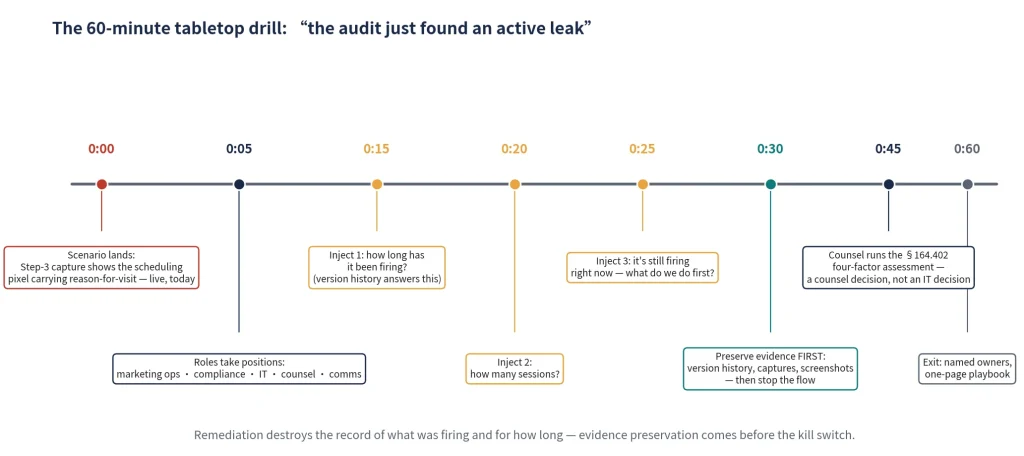
Run a 60-minute tabletop drill once, and the day a leak surfaces is procedure instead of panic.
The scenario: “This morning’s Step-3 capture shows the scheduling pixel carrying reason-for-visit to a non-BAA endpoint. Live. Today.”
The roles: marketing ops (owns the tag manager), compliance (runs the room), IT (owns the captures), counsel (owns the legal call), comms (owns nothing yet – and should say so).
Timed injects: 0:15 – “How long has it been firing?” (version history answers this; if nobody can produce it, that’s a drill finding). 0:20 – “How many sessions?” 0:25 – “It’s still firing right now. What do we do first?”
The decision points, in order:
- Preserve evidence first. Export the tag manager version history, save the captures, and screenshot the current configuration. Remediation destroys the record of what was firing and for how long. That record is what your scope determination runs on.
- Then stop the flow. Remove or disable the tracker. You can’t assess a leak that’s still leaking.
- Then the four-factor assessment. Under 45 CFR § 164.402, an impermissible disclosure is presumed reportable unless you demonstrate a low probability that the PHI was compromised: what was sent, who received it, whether it was actually acquired or viewed, how far you’ve mitigated. This is counsel’s decision, not IT’s. Notification letters have a settlement value attached. The breach-analysis decision walks the law. The drill rehearses the hour before it.
Exit criteria
Every open question has a named owner, and the one-page playbook (preserve, stop, assess, call counsel) is drafted and filed with the audit evidence.
The HIPAA tracking audit worksheet
Everything this article produces lands in one working document, one row per observed script:
script URL, script domain, discovered-by (GTM / crawl / CSP), initiator, chain depth, vendor, BAA status, page tiers where observed, payload fields observed, verdict, owner, capture timestamp, HAR reference
chain depth counts edges from the document root (page → gtm.js → fbevents.js = 2); page tiers uses Step 2’s T1/T2/T3 class names. Judge by origin, not depth, per Step 4.
Two worked rows (synthetic, illustrative) show what “done” looks like:
| script URL | domain | discovered-by | initiator | chain depth | vendor | BAA | tiers | payload fields observed | verdict | owner | captured | HAR ref |
| connect.facebook.net/en_US/fbevents.js | connect.facebook.net | crawl + CSP | gtm.js | 2 | Meta Platforms | none | T2 scheduling | dl=/appointments/orthopedics?reason=[redacted], em (hashed email) | 🔴 remove from data-entry pages or BAA-route | marketing ops | 2026-08-06 14:22 UTC | /captures/2026-08-06/scheduling_chrome_us_consent-default.har |
| www.clarity.ms/tag/[id] | clarity.ms | CSP only; absent from GTM – vendor-injected (proven by the initiator chain, not the delta) | js.hs-scripts.com | 2 | Microsoft Clarity | none | T1 portal login | session-replay events, page URL, Referer header | 🔴 kill immediately; replay on an authenticated surface | web team | 2026-08-06 14:31 UTC | /captures/2026-08-06/portal-login_chrome_us_auth-synthetic.har |
Row 2 is both hard methods paying off in one line: a reconciliation delta (in CSP, absent from GTM) and a chain-depth-2 fourth party – a row a container-only audit never produces. Across a quarter, the sheet is your drift log. New rows appear with a discovery date. Resolved rows keep their captures.
Download the HIPAA tracking audit worksheet.
How Melurna helps in the HIPAA tracking audit
The manual method strains in exactly the four places the article already pointed out:
- Fourth-party runtime chains, at scale. The Step-4 chain walk is one capture. Doing it continuously, across every page, is what surfaces vendor-injected scripts like worksheet row 2 as they appear.
- Continuity. Quarterly sweeps miss mid-quarter drift (Step 9). Continuous observation is what makes “regularly review” operational instead of aspirational.
- Reconciliation without engineering. No GTM-API pulls, Playwright harness, or CSP collector to build and maintain. Discovery is agentless.
- Multi-property scale. One surface register is an afternoon; forty of them, across CMSes and an app, is a platform job.
Melurna observes client-side pixels and event transport (including past-agency tags and fourth-party scripts). It maps the path from your site to the vendors you approved, and on to the parties those vendors load in turn. It flags new or changed trackers as your sites and campaigns change, with compliance mapping across 30+ frameworks, including HIPAA.
A privacy program describes what should be happening. We show you what it actually is. Turn continuous tracking into continuous assurance backed by evidence with our HIPAA tracking compliance solution.
Next steps
Your audit is accurate until the next publish, and you don’t control when that is. Four things move independently of your compliance calendar.
- Marketing publishes through the tag manager. Publish rights are effectively production-change rights, and marketing usually holds them. No ticket, no review, new tag live.
- Vendors update their scripts. The URL stays the same. What it loads changes. Your chain graph quietly stops being true.
- New pages inherit site-wide tags by default, including on condition pages.
- Chains vary by geography and consent state. Your capture was one configuration out of the twelve-plus that exist for a single-market organization.
So re-run the audit quarterly at minimum, after every release, after every campaign launch, continuously if you want maximum assurance. That last constraint is the one that doesn’t scale by hand, and it’s what Melurna is built around. We tell you what your site is sending, continuously, so you and your counsel are working from facts.
FAQs
Is this the same as a HIPAA audit?
No. This is a technical inventory of tracking code on your websites and apps. An OCR audit is a regulatory review of your whole compliance program.
What is a fourth-party script?
One loaded by a vendor you approved rather than by you. Whether you can demand answers depends on whether that party is your vendor’s subcontractor under 45 CFR 160.103, which turns on delegation.
What evidence should we keep?
HAR captures with conditions and timestamps, raw CDP event logs, CSP report exports, tag manager version history, the vendor query log, and the BAA reconciliation. Scrub credentials from authenticated captures first. Six years, matching your Security Rule documentation retention.
Do we need to audit the mobile app too?
Yes. SDKs are compiled into the build and invisible to your tag manager, and mobile ad identifiers (IDFA, AAID) don’t clear like cookies: Apple and Google both document them as device-level identifiers the user resets or revokes in OS settings. Trace a test build through an HTTP proxy, replay a real patient journey, and log every endpoint each SDK calls.
Can I run this audit with Google Tag Manager alone?
No. A container export shows approved intent, not reality: it misses hardcoded template tags, vendor-injected scripts, second containers, and anything in the mobile app.
Can a cookie banner replace a tracking technology audit?
No. OCR’s bulletin is explicit that a cookie banner is not a HIPAA authorization, and a banner tells you nothing about what fires behind it or before consent is given. A misconfigured banner on an authenticated or scheduling page is itself an audit finding.
DISCLAIMER: This article is for general informational purposes only and does not constitute legal advice. While we strive for accuracy, we make no warranties about the completeness or reliability of this information and are not liable for any errors, omissions, or actions taken based on its contents. Consult a licensed attorney for guidance specific to your business.