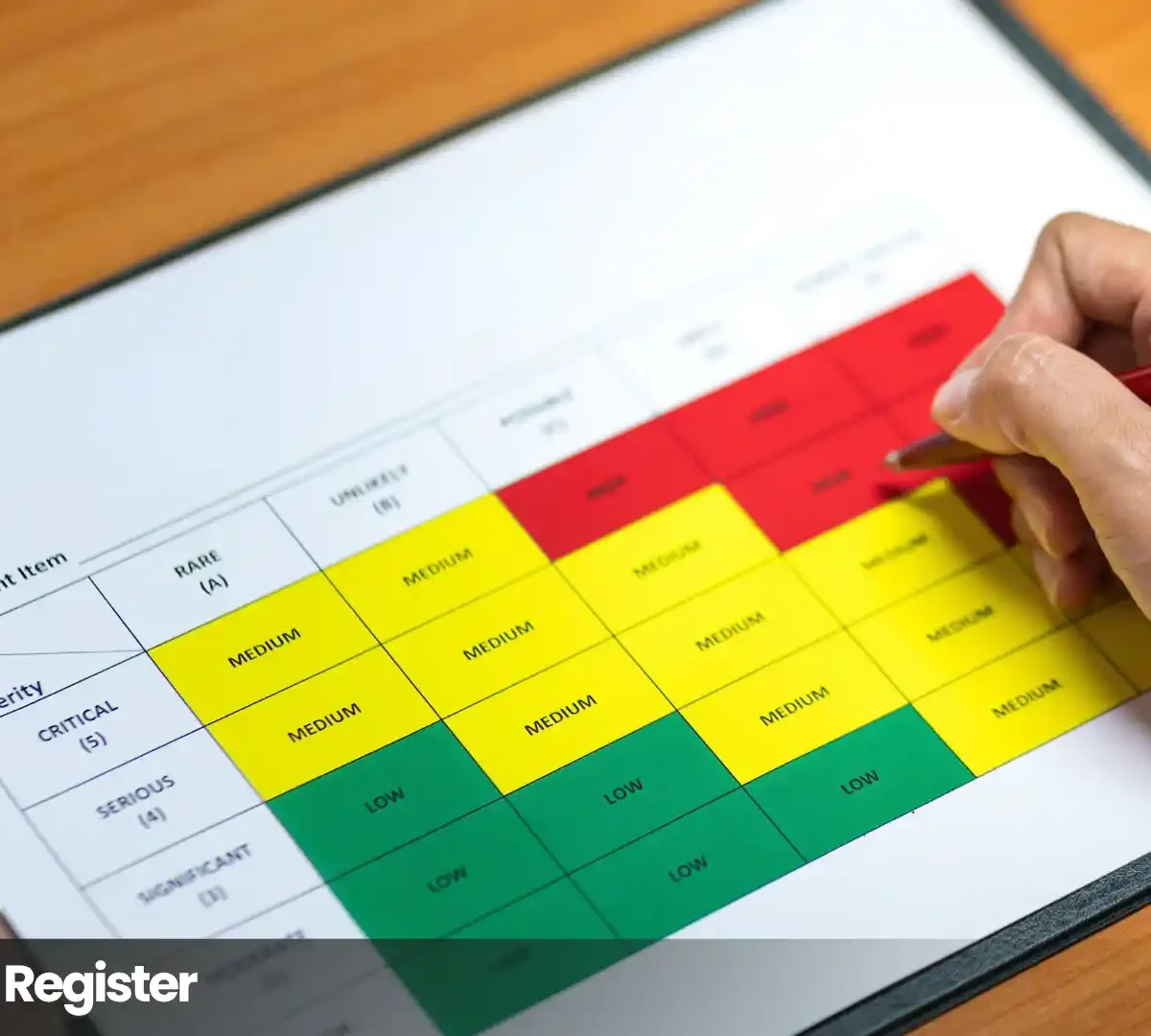

A risk register is an up-to-date list of the risks your organization has identified. It shows what each risk is, how likely it is, how much harm it could cause, who is responsible for it, and what actions are being taken. Auditors, regulators, customers, and boards can ask for it by name as proof that risk management is actually happening.
Regulators want to see that risk management is ongoing and real. If your documents are out of date, they can become a problem instead of helping you. In May 2023, the New York Department of Financial Services fined bitFlyer USA $1.2 million. The company had an IT audit from its parent company, but the regulator rejected it because it only showed that policies existed and did not show real security risks or what was being done to address them.
Key takeaways
- A risk register is the record of identified risks: described, scored, owned, tracked to closure. A risk log is the same thing.
- Keep the three artifacts straight: the assessment is what you do, the register is what you keep, the treatment plan is what you owe.
- Ten fields form the working minimum. Privacy programs add source assessment, affected individuals, and RoPA/vendor linkage.
- Three scores per row: inherent (before controls), residual (after), target (after planned treatment). The gaps are where management happens.
- Every row gets a named owner, a review date, and an escalation trigger. Risks close on the record, with a date and a reason.
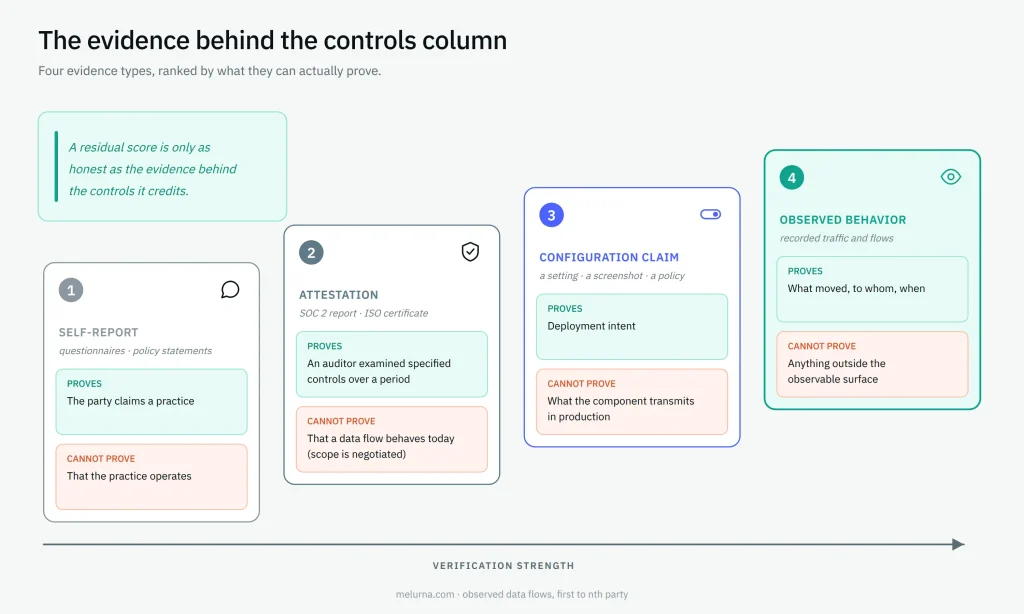
- A register is only as honest as the evidence behind its controls column: record whether each control is self-reported, attested, configuration-claimed, or observed, and score accordingly.
What makes a risk register useful to examiners, instead of a problem for you, is how it is put together, who is responsible for each entry, and whether it matches what is actually happening.
What is a risk register?
A risk register is an up-to-date list of the risks an organization has found. Each risk is described, given a score for how likely and how serious it is, assigned to someone responsible, and tracked until it is resolved.
“Risk” here is broader than a threat: ISO 31000 defines risk as the “effect of uncertainty on objectives,” negative or positive, so a register can hold opportunities too. Most security and privacy programs use it for threats (ISO 31000:2018).
The artifact has a documented pedigree. ISO’s former risk vocabulary defined the risk register as the “record of information about identified risks,” with “risk log” as its synonym. That vocabulary (Guide 73:2009) was withdrawn and replaced by ISO 31073:2022, but the definition stuck. ISO Guide 73:2009, withdrawn NIST’s current U.S. government guidance calls the register “a repository of risk information including the data understood about risks over time.” That “over time” is the point: a register accumulates knowledge, it does not freeze it (NIST IR 8286 Rev. 1). The concept descends from PMBOK project management practice, was generalized for whole organizations by ISO 31000, and is now standard in enterprise, cybersecurity, and privacy compliance programs.
At the highest level, every register row holds five things:
- Identification: risk ID, risk description, risk category.
- Scoring: likelihood and potential impact, before and after controls.
- Ownership: one named, answerable person.
- Response: controls in place and the treatment decision.
- Tracking: risk status, review date, escalation trigger.
A register is a record, not a report. A risk report is a snapshot for an audience. The register is the living document those reports draw from. It stays open between them.
Risk register vs risk assessment vs treatment plan
The assessment is what you do, the register is what you keep, the treatment plan is what you owe. All three are routinely conflated. The conflation is where programs quietly break.
| Artifact | What it is | Cadence | Who uses it |
| Risk assessment | The process of identifying, analyzing, and evaluating risks | Point-in-time or periodic exercise | Assessors, risk owners |
| Risk register | The standing record of identified risks, scores, owners, responses | Living, reviewed on cadence and on change | Owners, management, auditors |
| Risk treatment plan | The project record of actions against selected risks: tasks, owners, deadlines, targets | Lives until its actions are complete | Project leads, risk owners |
| Risk report | A snapshot of register contents for an audience | On demand or per reporting cycle | Board, regulators, customers |
| Risk matrix | The scoring grid for likelihood against impact | A tool, not a record | Whoever is scoring |
The failure mode is treating one artifact as another: the last assessment’s output filed away “as the register,” or the register treated as the treatment plan, with no tasks, owners, or deadlines attached. The risk management process is iterative. The register is what the process continuously updates. The treatment plan closes the gap the register exposes.
For the assessment method itself, see the data privacy risk guide. Choosing between instruments (PIA, DPIA, variants)? The privacy impact assessment guide.
Who expects a risk register?
No statute names “a risk register.” What laws and frameworks require is documented, ongoing identification, analysis, and treatment of risk. The register is the artifact that evidences it, which is why auditors, certification bodies, regulators, insurers, and enterprise customers all ask for it in their own vocabulary. These are the expectations organizations most commonly face, not a complete set.
| Framework / counterparty | What it actually requires | What the register evidences |
| ISO/IEC 27001:2022 | Clause 6.1.2: documented risk assessment process. 6.1.3: risk treatment plan with documented results | Documented results and treatment tracking |
| SOC 2 (AICPA Trust Services Criteria) | CC3.1: objectives clear enough to identify and assess risks. CC3.2: risks identified and analyzed as the basis for managing them | CC3.2 operating in practice, not on paper |
| HIPAA Security Rule | §164.308(a)(1)(ii)(A): required risk analysis. (B): required risk management to a reasonable, appropriate level | Both required activities, documented and current |
| PCI DSS v4.0 | 12.3.1: documented targeted risk analyses, reviewed at least every 12 months (mandatory since March 31, 2025) | TRA outcomes, review dates, follow-through |
| NIST SP 800-30 | The risk assessment process: identify, analyze, communicate risk for response decisions | Where assessment outputs land and stay alive |
| NYDFS 23 NYCRR §500.09 | Periodic risk assessment “sufficient to inform the design of the cybersecurity program,” updated annually and on material change, under written evaluation criteria (enforced in practice) | Categorized risks and how each is addressed |
| GDPR | Never names a register. Art. 5(2) accountability plus Art. 35: “an assessment of the risks to the rights and freedoms of data subjects,” “the measures envisaged to address the risks… and to demonstrate compliance,” reviewed when the risk changes (35(11)) | The follow-through between assessment and compliance |
| DORA (EU 2022/2554) | Arts. 5–6: documented ICT risk-management framework under management-body accountability, with yearly review and internal audit | The framework operating, with evidence |
| NIS2 (EU 2022/2555) | Art. 21: risk-management measures including “policies on risk analysis.” Art. 20: management accountability. Fines up to €10M or 2% of worldwide turnover (essential entities) | The risk-analysis policy executed as records |
| SEC Regulation S-K Item 106 | Describe processes for assessing, identifying, managing material cybersecurity risks, their integration into overall risk management, and board and management oversight | The internal record behind the disclosure |
| CCPA / CPRA | California’s 2026 rules add mandatory risk assessments for specified processing | Assessment records feeding the register (mechanics in the CCPA compliance guide) |
What does a missing or stale register cost?
Enforcement is the most obvious risk. BitPay paid $1 million because it only did one risk assessment ever. OneMain Financial paid $4.25 million with vendor risk ratings left stale after vendor incidents, rendering them moot. None lacked documents. They lacked a living record.
Certification is a less obvious risk. A SOC 2 Type 2 audit checks if controls worked over three to twelve months. If your register has not been updated since the last audit, it shows you were not managing risks during that time. SOC 3 reports even mention the risk register by name: Arrive Logistics’ SOC 3 report says “a risk register is maintained to record the risk mitigation strategies for identified risks.” Etlworks’ SOC 3 report describes the same practice.
Commercially, enterprise security questionnaires and cyber-insurance forms often ask for your risk register or its details. If your register is current, you can answer these requests quickly. If it is out of date, each request becomes a big task.
What key components and fields does a risk register need?
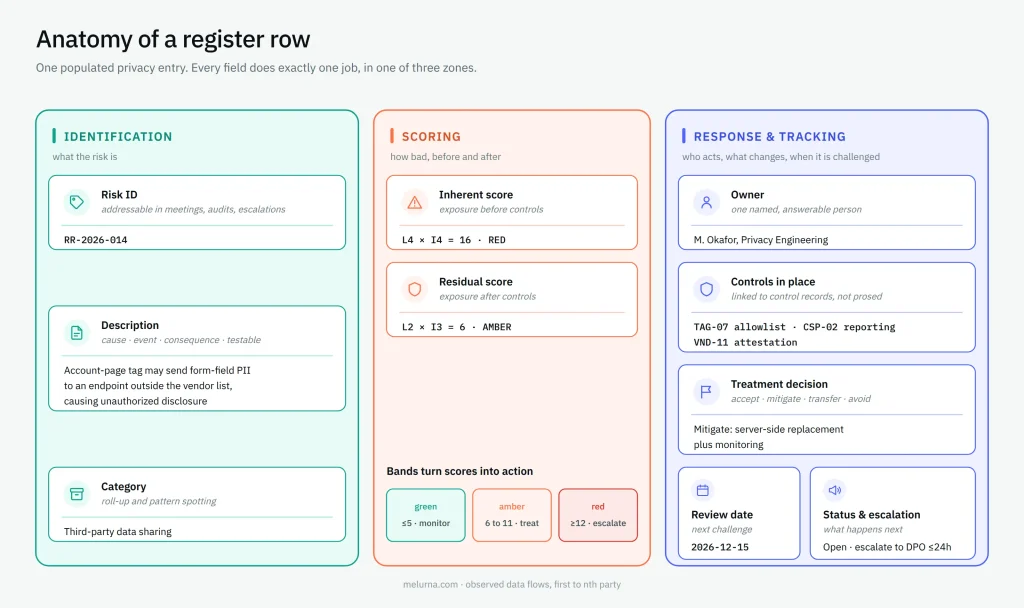
No matter how many columns your register has, each entry should do three things: identify the risk, score it, and show how you are responding. There are ten basic fields you need, and the table below is an example.
| Field | Its one job | Example entry |
| Risk ID | Makes the risk addressable in meetings, audits, escalations | RR-2026-014 |
| Description | States cause, event, and consequence so the risk is testable | Because the account page loads an unvetted third-party tag, form-field data may leak to an unlisted endpoint, causing unauthorized disclosure of customer PII |
| Category | Enables roll-up and pattern spotting | Third-party data sharing |
| Owner | One named individual answerable for the entry | M. Okafor, Privacy Engineering |
| Inherent score | Exposure before controls | L4 × I4 = 16 |
| Controls in place | What currently modifies the risk, linked to control records | TAG-07 allowlist, CSP-02 reporting |
| Residual score | Exposure after controls | L2 × I3 = 6 |
| Treatment decision | Accept, mitigate, transfer, or avoid, with rationale | Mitigate |
| Review date | When this entry is next challenged | 2026-12-15 |
| Status & escalation | Open / mitigating / closed, plus the escalation trigger | Open. Escalate if residual stays above 8 at next review |
Privacy additions
A privacy register adds three fields. Source assessment records which DPIA, LIA, TIA, or vendor review produced the entry: the follow-through GDPR Art. 35(7)(d) assumes. Affected individuals names the data-subject groups at risk. RoPA / system / vendor / transfer links wire the row to processing records so a change in the underlying system triggers the review Art. 35(11) calls for. (Both provisions, linked, in the sourcing section below.)
Maturity fields
As the program grows: target residual score, key-risk-indicator links, framework cross-map, audit trail of changes.
The description discipline
Whether your convention is cause-risk-effect or threat-vulnerability-impact, a usable description names the cause, the risk event, and the consequence. For example, “third-party scripts” is a topic, not a risk description. A description that cannot be tested cannot be scored honestly.
The staged field set descends from PMBOK practice: identify, analyze, plan responses. Columns arrive as the process needs them.
How to build a risk register, step by step?
The sequence follows ISO 31000‘s risk process and ISO/IEC 27005:2022, calibrated for a first build. Each step names its output. A step without an output is a meeting.
1. Set scope and methodology.
What the register covers, the scoring scale, the appetite line, the cadence, the escalation path. Output: a one-page methodology note. An auditor reads this first.
2. Identify risks from sources, not a blank page.
DPIAs, LIAs, TIAs, vendor reviews, incident history, audit findings, workshops, website data-flow mapping showing which PII actually leaves the browser, and to whom. The workshop is one source of potential risks, never the only one. Output: a candidate risk list.
3. Score inherent risk.
Likelihood and impact before any controls are credited. Output: a scored list.
4. Document controls, then score residual.
Link each risk to controls that genuinely operate today, then rescore. Output: control-linked rows with residual scores.
5. Evaluate against appetite.
Where a residual risk is accepted, record the rationale. Output: decisions on the record.
6. Write treatment and response plans.
For every risk above appetite: a target score, a named owner, a deadline. Output: a risk response plan per row.
7. Set cadence and closure rules.
Top-tier risks quarterly, the full register annually, any entry on material change, new risks and emerging risks added as they surface, and formal closure on the record: mitigated, period passed, or occurred-and-managed, with date and reason. Output: a living register. Closure is recorded, never deleted. Closed-risk history is audit credibility.
For the assessment method feeding steps 2–4 in a privacy program, see the data privacy risk guide.
Download the template | Sample Sheet
How does risk scoring work?
Most risk registers use a 5 by 5 scale, scoring the likelihood of the risk occurring from 1 to 5 and impact from 1 to 5. Before scoring, set clear definitions for impact, like money, time, or regulatory risk. For example, “I4” could mean regulatory action is likely or losses above €250,000. If you do not define these, the numbers are just guesses.
Three scores measure risk exposure, and each answers a different question:
| Score | What it shows | What the gap tells you |
| Inherent | Exposure before controls | How bad this could be untreated |
| Residual | Exposure after controls that actually operate | Inherent minus residual = what your controls are worth |
| Target | Exposure after planned treatment completes | Residual minus target = the work still owed |
Bands turn scores into action and help you prioritize risks: a common convention is red at 12 and above (escalate), amber 6–11 (treatment plan required), green 5 and below (monitor). Sanity-check the distribution: most risks should sit green or amber. An all-red register has no signal. It has anxiety.
Qualitative versus quantitative: ordinal scoring (1 to 5, or simply High, Medium, Low) is structured judgment. That’s fine for a first register. Quantitative risk analysis needs loss data most teams do not yet have. Start ordinal, calibrate, and graduate specific high-value rows later.
Calibration is the anti-drift control: one scale for the whole register and review any scores that seem off. Different teams might score the same risk differently. If nobody reconciles, the numbers lie.
The risk matrix is the scoring grid, a tool. The register is the record the tool serves.
Who is responsible for the risk register?
Risk ownership works at two levels, and mixing them up is a common mistake. Each risk should have one person responsible, not a team. If you list “security team,” no one is truly accountable. The whole register also needs an owner, like the CRO, head of risk, or DPO, who manages the process and updates. The board or audit committee reviews the most important risks.
How often should a risk register be reviewed?
Set it once, in the methodology note, and hold it. A standard practice schedule looks like this:
| Tier | Frequency | Trigger |
| Red-band / top-tier entries | Quarterly | Calendar |
| Full register | Annually | Calendar |
| Any entry | Immediately, ad hoc | New system, new vendor, regulatory change, incident |
How many risks should be in a risk register?
A good first risk register usually has between 20 and 80 entries. Fewer than 20 may mean you are missing risks. More than 80 may mean you are logging too much noise as risk. These are guidelines, not strict rules.
How to maintain a risk register that stays audit-ready
Reviews log what was checked and what changed: a date that advances with nothing else recorded proves nothing. Every review carries a dormant-risk check: any risk stalled in “mitigating” across two cycles with no score movement is closed, escalated, or formally accepted, on the record. Do this, and recurring audit and security-questionnaire questions become retrieval rather than research. Monitoring progress becomes reading the register, not rebuilding it.
Should you use a spreadsheet or software for your risk register?
It depends on program shape, not company size.
| A spreadsheet is enough when… | It breaks when… |
| First build cycle | Version control: three “final” copies circulate |
| One framework, one assessor, one team | Escalation: nothing fires when a red-band risk breaches its trigger |
| Rows in the low dozens | Control double-counting: one control credited across rows, linked to nothing |
| Manual-friendly cadence | Audit-trail rebuild: who changed what, when, becomes forensics |
The decision rule: count frameworks, business units, assessors. When any of those multiplies, the register wants a system of record with versioning, escalation, and an audit trail. Until then, a disciplined spreadsheet beats an abandoned platform.
Enterprise risk register vs project risk register
Both project and enterprise risk registers are similar, but they have different scopes. A project register comes from PMBOK practice. It covers one project: scope, schedule, and cost. An enterprise risk register covers the whole organization and answers to the board.
| Project register | Enterprise register | |
| Scope | One project’s delivery risks | Organization-wide: strategic, operational, cyber, privacy, third-party |
| Review | Project milestones and stand-ups | Quarterly top-tier, annual full review, board reporting |
| Audience | Project manager and team | Executives, board, auditors, regulators |
The roll-up runs in both directions, asymmetrically. Project risks escalate up when material beyond the project. Enterprise-managed risks are not duplicated down. Larger organizations run federated registers: operating registers per business unit, system, or project feeding one master register (per-system registers, including registers for individual AI systems, are one instance of this pattern). NIST’s enterprise guidance formalizes the roll-up from system to organization to enterprise level. NIST IR 8286 series
No matter which type you run, the risk register is the main record that board reports and audit reports check against. Regulators read the same record. If your board pack and the register tell different stories, the register loses. Eventually, so does the program.
Where do privacy register entries come from?
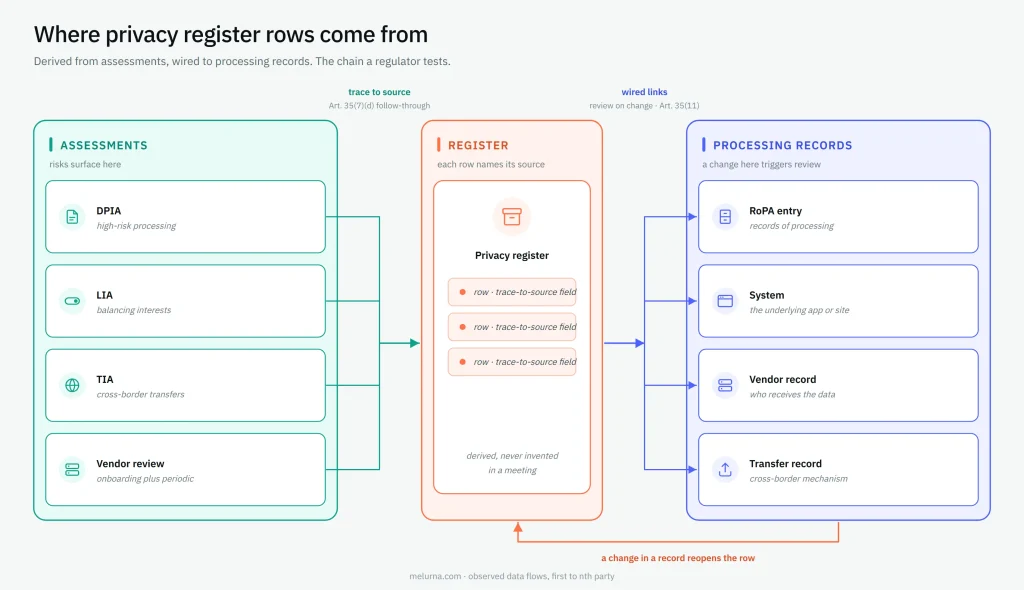
Privacy risks should come from real assessments, not just ideas from a meeting. There are four main sources for privacy register entries:
- DPIA: risks to data subjects from a data protection impact assessment for high-risk processing.
- LIA: risks surfaced while balancing interests in a legitimate interests assessment.
- TIA: transfer risks from a transfer impact assessment for cross-border flows.
- Vendor review: third-party risks from onboarding and periodic assessments.
Each row carries a trace-to-source field naming its assessment. Regulators test this chain: GDPR Art. 35(7)(d) requires the DPIA to contain “the measures envisaged to address the risks… and to demonstrate compliance.” The register row is where those measures live after the assessment is filed. GDPR, EUR-Lex
Rows also link outward to the records of processing. The RoPA entry, system, vendor, transfer. That linkage makes review-on-change operable: Art. 35(11) requires review “at least when there is a change of the risk represented by processing operations,” and a wired register row is how the change finds the assessment. The ICO’s DPIA guidance expects the same lifecycle discipline. ICO DPIA guidance
Details in: Privacy Impact Assessment | Vendor Privacy Risk Assessment | California’s 2026 Mechanics
How do risk registers fail?
All of the problems listed below undermine effective risk management, and all are caused by how the program is run:
| Pattern | What it looks like | The fix |
| 1. Stale entries | Review dates pass untouched, scores frozen across cycles. NYDFS fined OneMain $4.25M in a case where vendor risk ratings were never adjusted after vendor incidents | Cadence plus the dormant-risk check: two cycles stalled in “mitigating” → close, escalate, or formally accept |
| 2. Scoring drift | The same risk scores differently by team or by quarter | One anchored scale, calibration in review |
| 3. Team-as-owner | “Owner: Security team.” No one is answerable. Nothing moves | A named individual on every row, no exceptions |
| 4. Aspirational controls | The controls column lists what should exist, not what is evidenced to operate | Record the evidence type behind each control (next section) |
| 5. Control double-counting | One control credited across many rows. When it fails, a dozen residuals were wrong at once | Controls linked to a single control record, shared dependencies counted |
| 6. Written for the auditor | The action graveyard: treatment items without owners, deadlines, or escalation. The register wakes up only before audits | Escalation triggers in the status column, closure recorded with date and reason |
A register can be current, owned, and scored, and still be dishonest about its controls.
Risk register evidence: Stated claims vs. observed Behavior
Every risk register has a column for controls. But whether that column shows how each control was checked is another question. The trust you can place in it depends on who entered the information, and this is where the quality of the register can differ from how it looks.
Not all evidence is equal. Four types, ranked:
| Evidence type | What it can prove | What it can’t |
| Self-report (questionnaires, policy statements) | The party claims a practice | That the practice operates |
| Attestation (SOC 2 report, ISO certificate) | An auditor examined specified controls over a period | That a given data flow behaves today. Scope is negotiated |
| Configuration claim (a setting, a screenshot, a policy) | Deployment intent | What the component actually transmits in production |
| Observed behavior (recorded traffic and flows) | What moved, to whom, when | Anything outside the observable surface |
The danger of relying on stated claims
GoodRx’s stated position was a privacy promise not to share users’ health information, displayed under a HIPAA seal. The observed behavior was tracking pixels and SDKs sending prescription and health-condition data to Facebook, Google, Criteo, Branch, and Twilio. In February 2023, the FTC made GoodRx its first-ever Health Breach Notification Rule enforcement: a $1.5 million civil penalty and a permanent ban on sharing health data for advertising. GoodRx’s own 2023 notice to users admitted it shared “details about drug and health conditions people searched and their prescription medications” with third parties, in some cases to target health-related ads. Doe v. GoodRx settlement filing
The FTC’s Director of Consumer Protection, Samuel Levine, framed the enforcement wave plainly:
“Digital health companies and mobile apps should not cash in on consumers’ extremely sensitive and personally identifiable health information… The FTC is serving notice that it will use all of its legal authority to protect American consumers’ sensitive data from misuse and illegal exploitation.”
None of this is exotic technology. The FTC’s Office of Technology has documented that tracking pixels can capture and send personal data, including what users type into forms. Researchers cited in that analysis found thousands of the most-visited webpages leaking personal information to third parties this way. FTC Office of Technology, March 2023
The limits of observation
Observation only covers what you can see in browsers and apps. You cannot use it to check things like data center fire systems or how employees handle data off the main channels, so some register entries rely on attestation. The goal is not to observe everything, but to record what kind of evidence supports each control and score accordingly. A residual score is only as trustworthy as the evidence behind the controls.
Attestation has real limits as vendor evidence. What SOC 2 and ISO certificates do and do not prove about a vendor’s data practices are explained in our third-party privacy risk management article.
How do you evidence website data flows in a risk register?
Website data-flow rows decay fastest, and they are the hardest to evidence by attestation, because the vendors behind a page change without telling anyone.
MELURNA observes what browsers and applications actually send, and that output maps directly onto register fields:
| MELURNA observes | Register fields it feeds |
| Which tags, pixels, and SDKs fire on each page or journey | Description, category |
| What linkable values they carry | Description (consequence), affected individuals |
| Every recipient resolved, including hidden first-, third-, and fourth-party chains | Controls in place, vendor / transfer links |
| What changed since the last review (journey change monitoring) | Review date, status |
| Repeat analysis verifying remediation and detecting drift | Residual score, closure evidence |
| Stated-versus-observed gaps surfaced against policy and vendor claims | The evidence type recorded per control |
The platform monitors sensitive data across websites, apps, and user journeys, resolves every recipient, and preserves the evidence chain, so the register’s website rows can cite observed behavior rather than a vendor’s questionnaire.
FAQs
Is a risk register the same as a risk assessment?
No. The assessment is the process you run. The register is the standing record the process keeps. A treatment plan is the third sibling: the project record of actions owed against selected risks.
How often should a risk register be reviewed?
Top-tier (red-band) entries quarterly, the full register at least annually, and any single entry immediately on material change: a new system, a new vendor, a regulatory change, or an incident.
Is a risk register legally required?
No statute names “a risk register.” What laws and frameworks require, from HIPAA’s risk analysis provision to GDPR’s accountability principle to NYDFS §500.09, is documented, ongoing risk identification and treatment. The register is the artifact auditors, regulators, and counterparties expect as evidence of it. Whether any of these binds your organization is a question for your counsel. This page describes practice, not law.
DISCLAIMER: This guide is for general informational purposes only and does not constitute legal advice. While we strive for accuracy, we make no warranties about the completeness or reliability of this information, and are not liable for any errors, omissions, or actions taken based on its contents. Consult a licensed attorney for guidance specific to your business.